Data Trust & Governance
36 documented data-quality checks across your Dolibarr records, a review queue to work every issue, and a fix that only counts when a later scan proves it. Read-only. No AI. No telemetry.
Watch on YouTube ↗
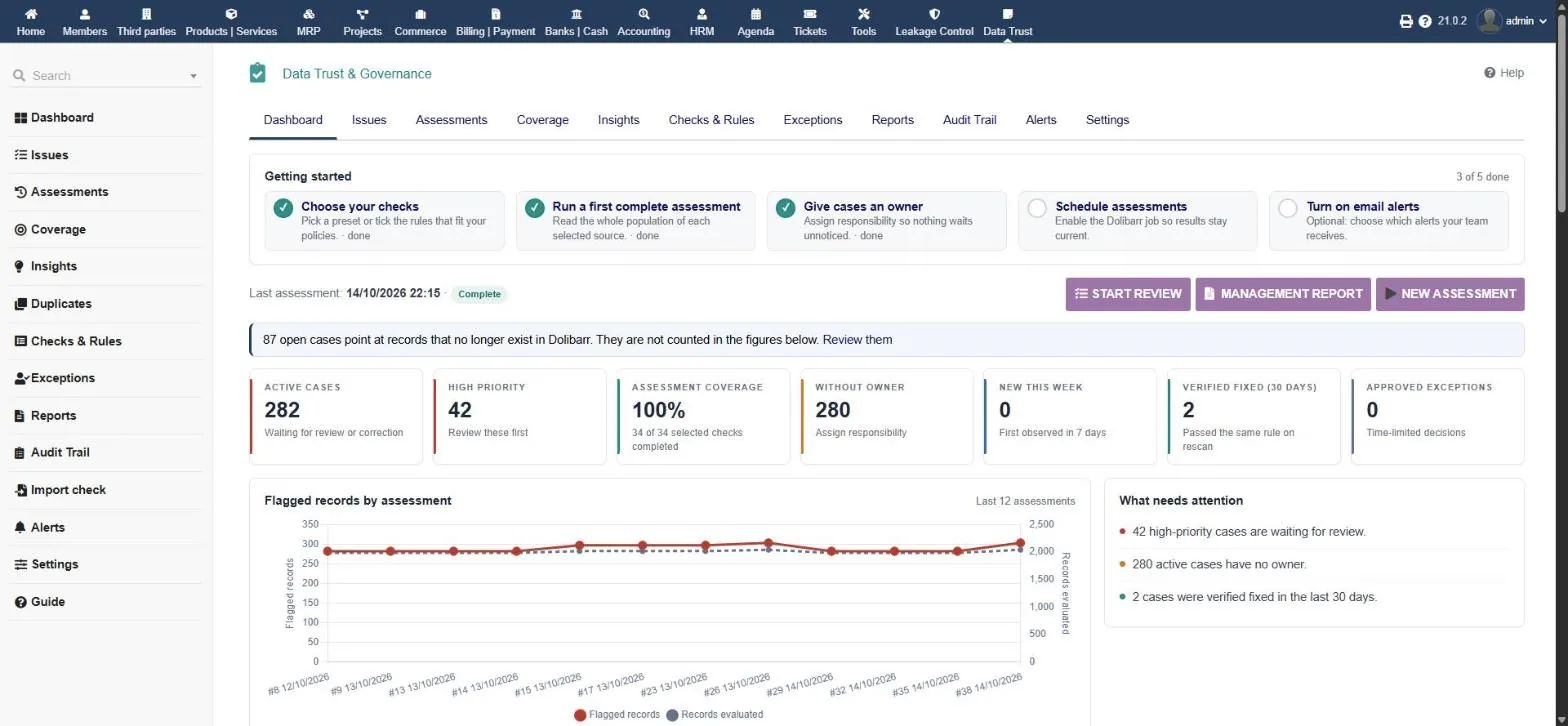
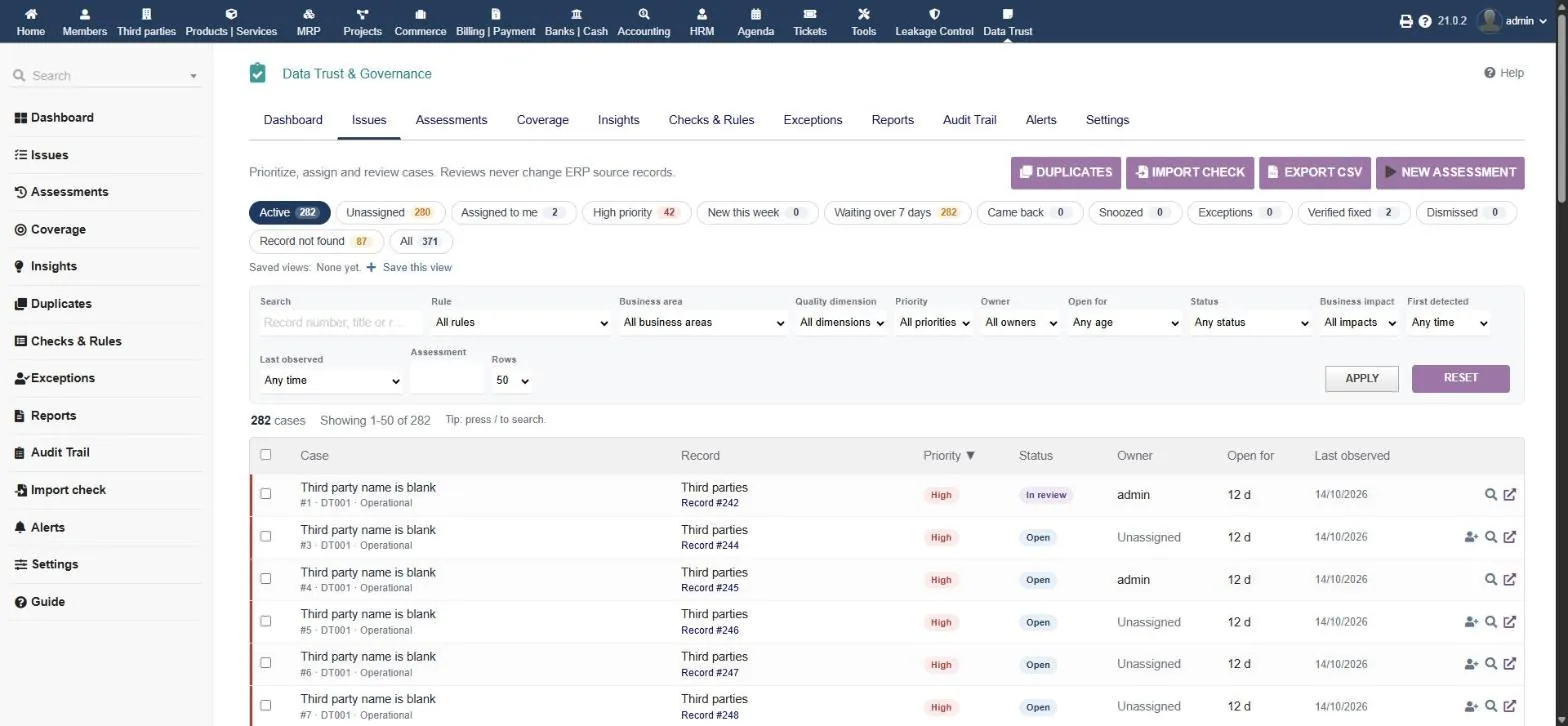
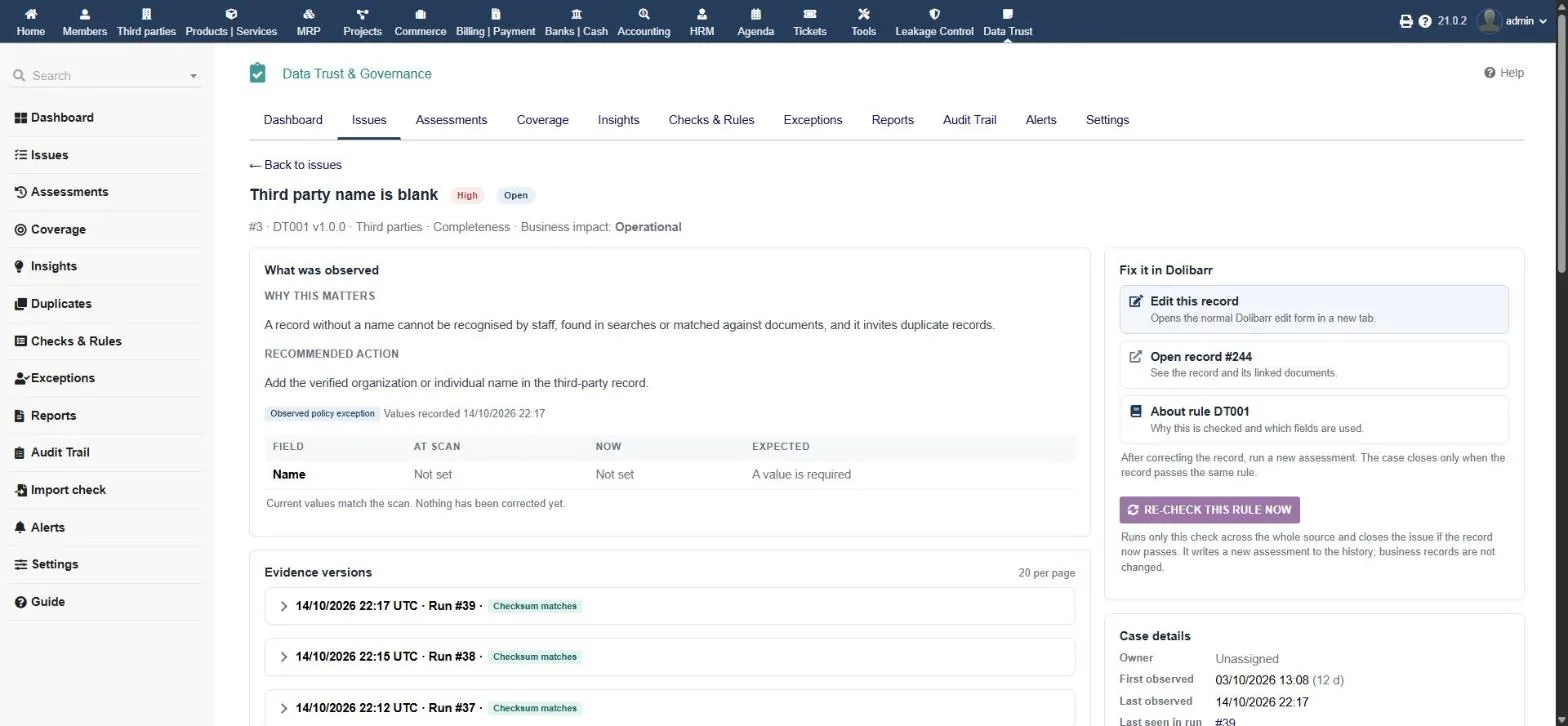
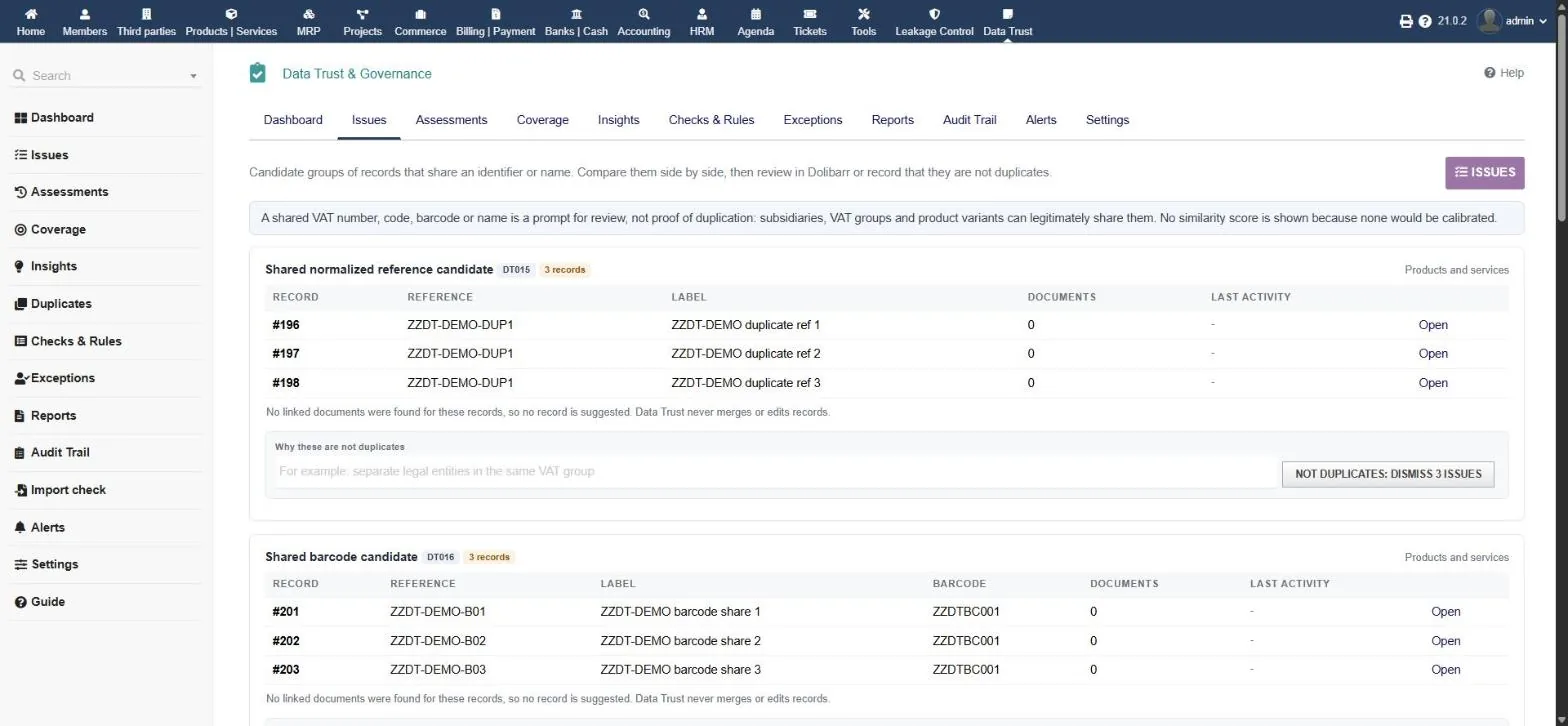
Policy presets, an assessment, the issues queue, an issue with its evidence, duplicates, exceptions and the management report.
Why businesses need it
Duplicate customers, broken links and wrong bank details don't show up on a dashboard. They show up as a wrong invoice, a payment to the wrong account or a report nobody believes.
The same customer created twice, products sharing a reference or barcode, missing payment terms and codes. Every downstream document inherits the error.
Invoices pointing to third parties that no longer exist, net + tax that doesn't equal gross, invalid IBANs and one bank account shared by several suppliers.
A one-off clean-up spreadsheet has no owner, no proof and no follow-up. Six months later the same problems are back and nobody can say what was fixed.
How it works
The module never repairs data itself. People fix records in Dolibarr, and the next scan proves the fix.
Pick a business-type preset (distribution, retail, services, manufacturing, small business) and adjust any check.
Whole-population scans in batches, within time and memory budgets. Nothing is written to ERP tables.
Each failing record opens an issue, updates an existing one, or is flagged as “came back” after a fix. Evidence is stored with a checksum.
Assign owners, review, snooze, dismiss with a reason, request an exception, and open the record to fix it in Dolibarr.
An issue closes only when a later complete scan shows the same record passing the same rule. Nobody can simply mark it fixed.
Features
Owners, evidence, exceptions and history, all inside Dolibarr. CSV export everywhere.
Setup checklist, KPIs (active, high priority, coverage, without owner, verified fixed), trend of flagged vs evaluated records and “what needs attention”.
Quick views (mine, unassigned, high priority, came back, waiting 7+ days), filters, saved views, bulk review with preview and keyboard shortcuts.
Why it matters, the recommended action, values at scan / now / expected, evidence versions, notes and history, and “re-check this rule now”.
Run history with status, duration and policy fingerprint. Comparison refuses unlike-for-unlike runs, so improvements are never invented.
Per business area: whether the source is ready, how many records it holds and which checks can run or are blocked.
Weekly flow of new, fixed and returning issues, where issues concentrate, recurring issues and how flagged records entered the ERP.
Candidate groups side by side with linked-document counts and an advisory “most used” record. It never merges anything.
Accept a known observation for a limited time. One administrator requests, a different one approves, and it expires automatically.
Printable report per run: scope, sources read, a quality scorecard by dimension, results per check and exceptions.
Every event with time, user, before → after and reason: detected, assigned, exception approved, verified fixed, reopened.
Check a third-party CSV before importing it: missing names, bad e-mails, unknown countries and records that already exist in Dolibarr.
Five alerts inside Dolibarr and/or by e-mail. They only ever reach active internal users and contain counts and links, never record values.
The 36 checks
Fixed, documented and deterministic. Each check page lists its fields, priority, limits, why it matters and the recommended action.
Blank name, e-mail syntax, missing customer/supplier code, country, address and payment terms; shared VAT, name + country and code candidates.
Blank reference or label, shared reference and barcode, cost basis, missing unit, negative measurements, stray whitespace, stock that differs from warehouse totals.
Documents pointing to a missing third party or product, due date before invoice date, dates far in the future, net + tax ≠ gross, header ≠ lines.
Payment allocations pointing to a missing invoice or exceeding the invoice total; stock rows pointing to a missing warehouse.
IBAN checksum failures and one bank account shared by several third parties. Evidence is always masked.
Every check belongs to one: completeness, validity, uniqueness, consistency or integrity, with a high, medium or low priority.
No single “trust score”. Every percentage is shown with its counts: how many records were evaluated and how many were flagged.
The whole population was read. Only a complete run can close an issue.
A time, memory or row budget stopped the check. Never shown as clean, never extrapolated.
The source table or field is missing. Shown as such, not as a pass.
Screenshots
Click any image to enlarge.
Built for your team
Data quality is a team job. Each role gets a clear part of it.
Works the issues queue: assigns, reviews, snoozes, dismisses with a reason, bulk-reviews and re-checks a rule after a fix.
Reads the dashboard, scorecard, insights and management report, and approves exceptions.
Chooses the policy and scan scope, schedules assessments, sets up alerts and retention, and manages rights.
Catches invoice totals that don't add up, broken payment allocations, invalid IBANs and shared bank accounts before they cost money.
Keeps customer and supplier records complete and free of duplicates, and checks import files before they reach Dolibarr.
Get evidence, owners, exceptions and a complete history instead of a one-off clean-up spreadsheet.
Trust & security
A governance tool has to be governed itself. These are the rules it follows.
It never edits, merges, blocks, deletes or repairs records. Its history lives in its own tables.
No single trust score. Every percentage comes with its counts, partial runs are never shown as clean, and unlike runs are never compared.
Exceptions are time-limited and need a second administrator to approve. Expired exceptions turn back into active issues.
Alerts only reach active internal users who can open Data Trust. Addresses stored on a customer, supplier, contact or member are refused. If in doubt, it doesn't send.
No AI, no telemetry, no outbound calls. Bank evidence is always masked, and e-mails carry counts and links only.
Every issue event is in the audit trail with who, when, before → after and why, exportable to CSV.
From install to your first verified fix, without touching your data.
Get the .zip file from DoliStore.
Go to Home → Setup → Modules/Applications, upload the zip and enable Data Trust & Governance. Its tables are created on enable.
View, Run, Review, Configure and Export. Give View deliberately, because issue evidence can contain names and e-mail addresses.
Pick a business-type preset in Settings or on New assessment, and adjust any check.
Then open Coverage to see what each check could read and whether anything was partial or not assessed.
Assign owners, fix records in Dolibarr from the issue page, and use “Re-check this rule now” to confirm the fix.
Enable the daily assessment job and switch on the alerts you need, inside Dolibarr and/or by e-mail. Everything is off until you turn it on.
No. It never edits, merges, blocks or deletes ERP records. It shows the issue and the evidence, people fix the record in Dolibarr, and a later scan verifies the fix.
Only when a later complete assessment with the same policy shows the same record passing the same rule. Nobody can simply mark an issue as fixed.
A single score hides what was actually checked. Every result is shown with its counts (records evaluated and flagged) and its coverage, so nothing is overstated.
No. It shows candidate groups side by side with linked-document counts. A shared VAT number or reference is a prompt to look, not proof, because subsidiaries and variants can legitimately share one.
Request a time-limited exception. A second administrator must approve it, and when it expires the issue becomes active again.
No. A recipient firewall allows only active internal users who can open Data Trust, and refuses any address that is also stored on a third party, contact or member.
No. All 36 checks are deterministic. There is no AI, no telemetry and no outbound call unless you switch on an e-mail alert.
Scans run in batches within time and memory budgets. On synthetic tests, 200,000 third parties completed under a 128 MB PHP limit and 500,000 under 256 MB.
Dolibarr 21, with PHP 7.4 or 8.2 and MySQL/MariaDB, on the current entity. MultiCompany sharing and PostgreSQL are not supported in this version.
Runs on a standard Dolibarr 21 installation and reads the areas you have in use.
DoliStore listing and pricing will be published here at launch. Questions before then? Write to us.