Dolibarr Module v1.10.0 Dolibarr 18 – 23 EN · FR · DE · ES · IT

Procurement Intelligence

Know what to buy, from whom, how much and by when. Purchase planning, inventory analytics and purchase alerts for Dolibarr, with the calculation behind every number.

Buy-by
date on every line
3
planning modes
A–D
supplier grades
0–100
inventory health

Watch the full demo

Procurement Intelligence for Dolibarr demo video Watch on YouTube ↗

Order Now, the “Why this quantity?” panel, draft purchase orders, supplier scorecards and the purchase alert report.

Why businesses need it

Buying on gut feeling costs twice

Dolibarr holds the sales orders, stock, supplier prices and lead times. What it doesn't do is turn them into a buying plan your team can trust.

Stockouts on orders you already won

Buyers find out too late that a confirmed order can't ship. Supplier lead times aren't in the decision, so the order goes out a week after it should have.

Cash stuck on the shelf

To stay safe, teams buy “just in case”. Overstock and dead stock pile up, money is tied up in the warehouse, and nobody sees its value until year end.

Suggestions nobody can explain

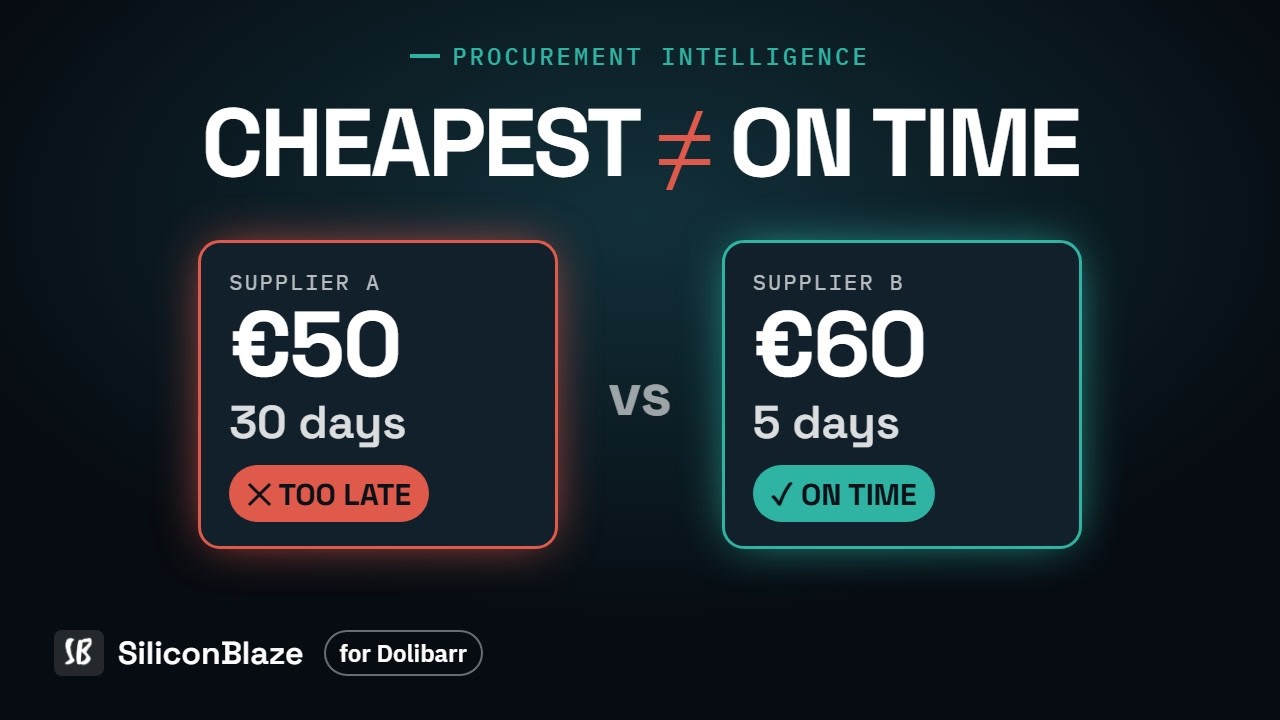
A spreadsheet or a black-box reorder list says “buy 240”, but nobody can say why. The cheapest supplier gets picked, then arrives too late.

How it works

From open orders to reviewed purchase orders in minutes

Every step uses data already in Dolibarr. Nothing is ordered until a person has reviewed it.

1

Read demand

Open sales orders, components still to consume on manufacturing orders, and kits planned as their components.

2

Net the supply

Stock plus supplier deliveries due within each product's lead time. Demand due later waits and shows its buy-by date.

3

Apply supplier rules

Minimum order quantity, price breaks and lead time. If the main supplier would arrive late, the page says which one arrives in time.

4

Review and create

Change quantities, switch supplier, untick lines, then create one draft purchase order per supplier.

5

Keep the team informed

One purchase alert report, inside Dolibarr and/or by e-mail, on a schedule or only when something new appears.

Features

Everything a buyer needs, in one module

Planning, inventory analytics, supplier performance and spend in one place. Every list can be filtered and exported to CSV.

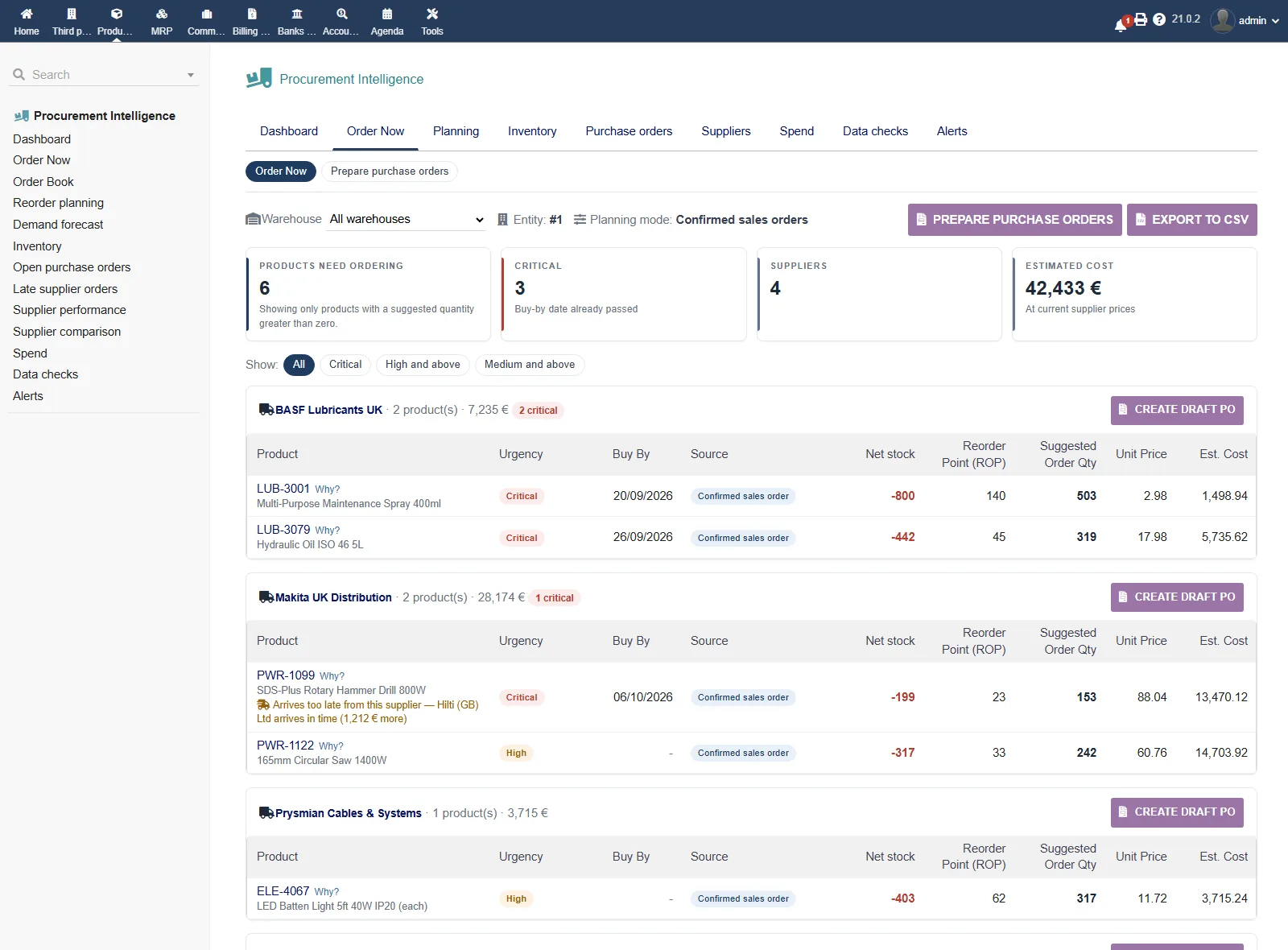
Order Now

What to buy today, grouped by supplier, with urgency (Critical / High / Medium / Low), buy-by date, price breaks and minimum order quantities.

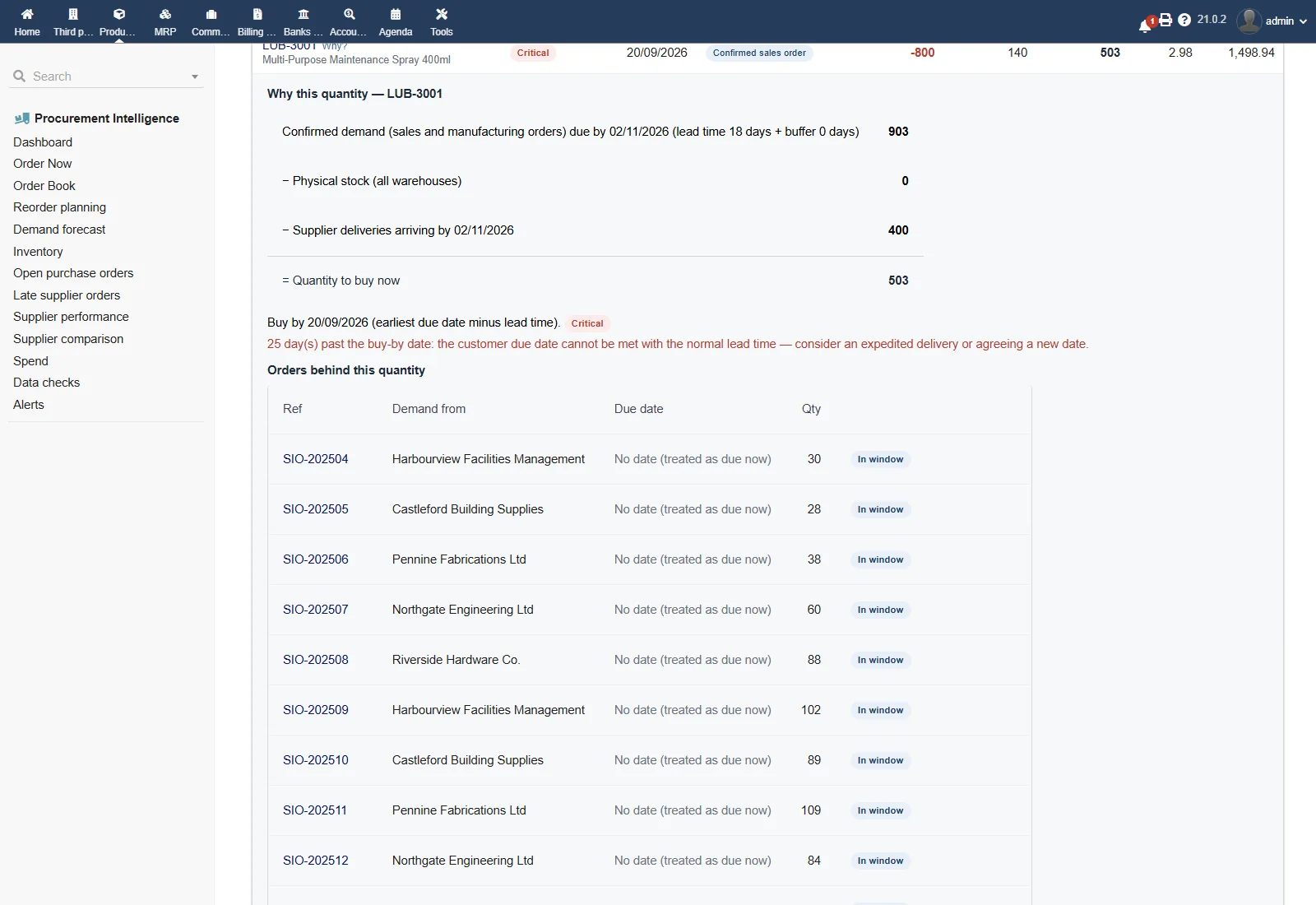
“Why this quantity?”

For every line: the sales orders, manufacturing orders and incoming purchase orders behind it, and the formula with the real numbers.

Draft purchase orders

One draft per supplier with the delivery date already set. A guard prevents duplicates. Nothing is validated or sent automatically.

Order Book and BOM explosion

Month-by-month (or week-by-week) projection with the shortfall date per product, plus multi-level component requirements and shortages.

Demand forecast

Simple or weighted moving averages, a seasonal index per month and forecast accuracy (MAPE) replayed on past months.

Reorder policy

Safety stock, reorder point and EOQ per product, with each formula shown. Plan from confirmed orders, from the forecast, or both combined.

Inventory analytics

Health score, ABC, XYZ and the ABC-XYZ matrix, dead stock, slow stock, stock aging per warehouse, stockout risk and overstock value.

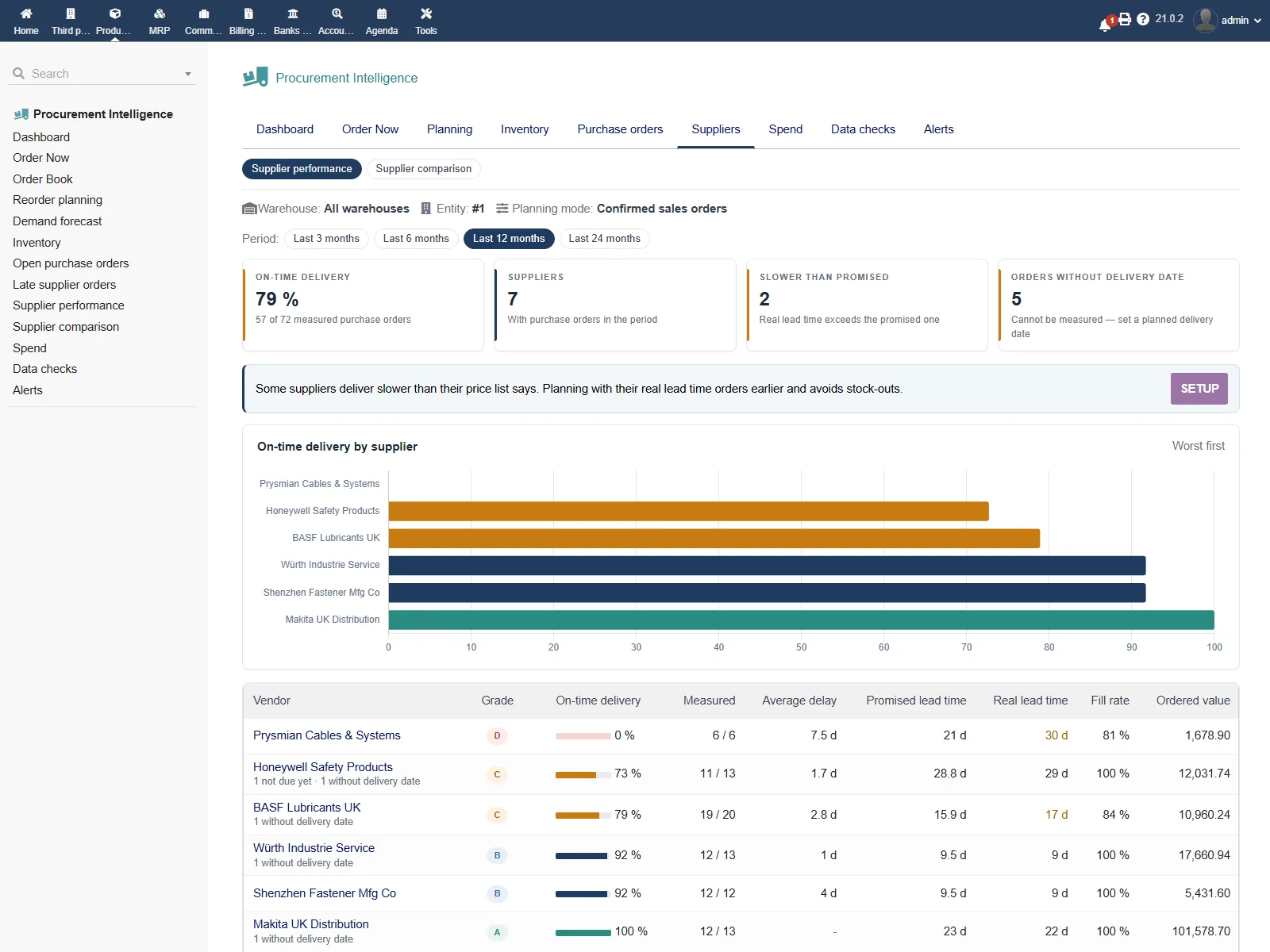
Supplier scorecards

On-time delivery %, real vs promised lead time, fill rate and an A–D grade. Optionally plan with a supplier's measured lead time.

Supplier comparison

Every supplier of a product side by side: price at the quantity you buy, lead time and reliability. It recommends the lowest total that still arrives on time.

Open and late purchase orders

Every open order with its stage, % received and due countdown. Late, stuck and undated orders are flagged with value outstanding.

Spend and price changes

Spend by month, supplier (with the 80/20 line) and product vs the previous period, plus purchase price changes and their impact.

Purchase alert report

Six sections: critical purchases, reorder needed, below safety stock, late supplier orders, stockout risk and dead stock. Delivered inside Dolibarr or by e-mail.
No black boxes

The maths, in the open

Every suggestion and every analysis shows its calculation on the page, so a buyer can explain it to a manager and a manager can trust it.

Quantity to buy

Demand due within lead time + buffer − stock − supplier deliveries due in the same window, then the supplier's minimum order quantity and price breaks.

Buy-by date

The latest day to order so the goods arrive before they are needed. Critical = the date has already passed; High / Medium / Low by how soon it falls.

Safety stock

Z(service level) × σ(daily demand) × √lead time, from the last 12 complete months of sales.

Reorder point

Average daily demand × lead time + safety stock. Raised to Dolibarr's own stock-alert limit when that is higher, and both values are shown.

EOQ

√(2 × annual demand × order cost ÷ (unit cost × holding %)). The economic quantity per order.

Stockout risk

On hand ÷ (average daily use × lead time). Below 1, stock runs out before a new delivery can arrive.

Inventory health

0–100 from four parts: products not at risk, products not dead stock, stock turnover (6× a year = 100) and products with stock. Grade A+ to F.

ABC / XYZ

ABC ranks products by revenue (80 % / 95 % limits). XYZ measures how steady monthly demand is (steady, variable, erratic). Both feed a 12-cell matrix.

Supplier grade

On-time delivery %, average delay, promised vs real (median) lead time and fill rate over 3–24 months, graded A to D.

8 data checks that make planning wrong

A plan is only as good as the data behind it. Each check explains why it matters and lists the records, with links to fix them in Dolibarr.

  • 01 Active products without a supplier price
  • 02 Supplier prices with no price
  • 03 Negative stock
  • 04 Supplier prices without a lead time
  • 05 Open sales orders without a delivery date
  • 06 Open purchase orders without an expected date
  • 07 Suggested purchases not marked “for purchase”
  • 08 Forgotten draft purchase orders

Screenshots

A tour of the module

Click any image to enlarge.

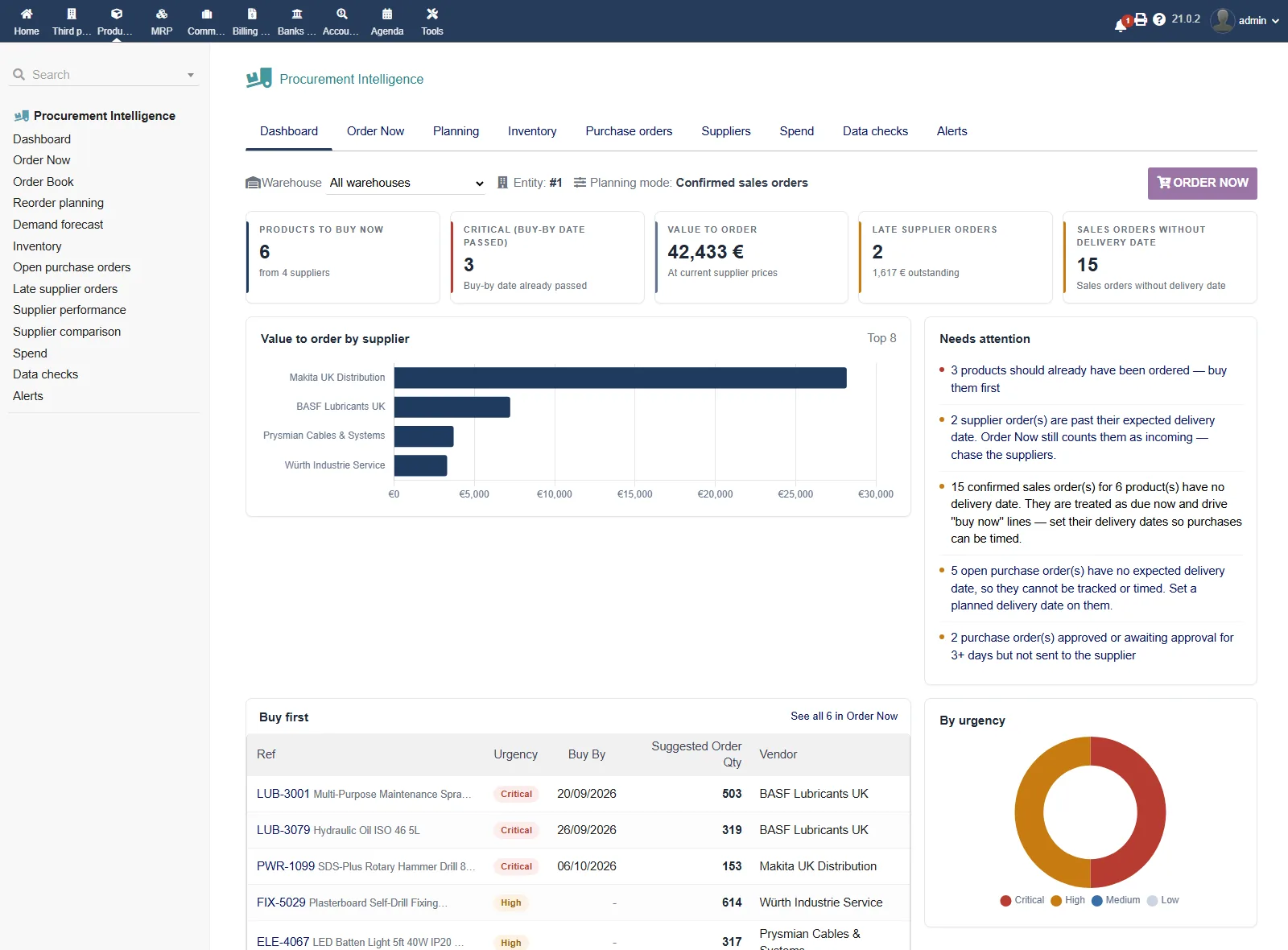
Procurement Intelligence: what to buy now, value by supplier and what needs attention
Dashboard — what to buy now, value by supplier and what needs attention
Procurement Intelligence: grouped by supplier, with urgency and buy-by date
Order Now — grouped by supplier, with urgency and buy-by date
Procurement Intelligence: the orders and the calculation behind a suggestion
Why this quantity? — the orders and the calculation behind a suggestion
Procurement Intelligence: on-time %, real lead time and grade A–D
Supplier scorecard — on-time %, real lead time and grade A–D

Built for your team

Who it is for

Wholesalers, distributors, retailers and light manufacturers on Dolibarr who buy from several suppliers.

Buyer / purchasing manager

Starts the day in Order Now, reviews suggestions with their reasons and turns them into draft purchase orders per supplier.

Stock and warehouse manager

Watches stockout risk, dead and slow stock, stock aging per warehouse and the inventory health score.

Production planner

Explodes BOMs for a quantity, sees component shortages and includes manufacturing-order demand in the plan.

Supplier manager

Grades suppliers on real performance, compares them per product and tracks late orders and price changes.

Owner / finance

Sees value to order, spend by supplier, capital tied up in overstock and dead stock, and gets the alert report.

Teams leaving spreadsheets

Replaces reorder spreadsheets with a plan built from live Dolibarr data, recalculated every time the page opens.

Trust & security

Safe by design

The module reads your data. The only records it creates are the ones you ask for.

Read-only on business data

It never changes your orders, stock or prices. The only writes are draft purchase orders you create and the alerts you switch on.

Drafts, never sent

Purchase orders are created as drafts for review. Nothing is validated or sent to a supplier automatically.

Permissions and security

Three rights: read, write (drafts and alert settings) and export. Every form is protected by Dolibarr's security token.

Alerts without a mail server

Alerts arrive inside Dolibarr through a bell in the top bar. E-mail is optional and uses Dolibarr's own mail settings.

Per warehouse, per company

Plan per warehouse; sales orders that carry a warehouse are planned there. Multi-company aware.

Settings that survive

Settings are kept when the module is disabled, re-enabled or upgraded.

Quick start guide

Up and running in about 10 minutes. No migration, no data re-entry.

1

Download the module

Get the .zip file from DoliStore.

2

Install via Module Manager

Go to Home → Setup → Modules/Applications, click “Deploy/install an external module” and upload the zip.

3

Enable the module

Turn on Procurement Intelligence. Products, Stocks, Sales orders and Purchase orders must be on; Manufacturing / BOM is optional.

4

Set permissions

Give buyers read and write (draft purchase orders, alert settings), and export to people who need CSV.

5

Fix what the data checks find

Open Data checks first: products without supplier prices or lead times are the most common reason a plan looks wrong.

6

Choose your planning mode

In Settings, pick confirmed sales orders (default), forecast or combined, and set service level, default lead time and valuation.

7

Open Order Now and switch on alerts

Review today's suggestions, create draft purchase orders, then choose who receives the purchase alert report and when.

Frequently asked questions

Does it change my data?

No. It only reads, except the draft purchase orders you create (never validated or sent) and the alerts you switch on.

How is the quantity to buy calculated?

Demand due within the supplier lead time (plus an optional buffer), minus stock, minus supplier deliveries due in the same window. The supplier's minimum order quantity and price breaks are then applied. The “Why this quantity?” panel shows every number.

Can it plan from a forecast instead of orders?

Yes. Choose confirmed sales orders, forecast (buy when usable stock reaches the reorder point) or combined (the larger of the two, never double-counted).

Do I need a mail server for alerts?

No. Alerts can be delivered inside Dolibarr with a bell in the top bar. E-mail is optional and uses Dolibarr's mail settings.

Do I need a cron job?

No. Checks run in the background while people use Dolibarr. For alerts on time at night, the Alerts page shows a ready-to-copy server command for Windows or Linux.

Can I plan per warehouse?

Yes. Pick a warehouse in the toolbar; sales orders assigned to a warehouse are planned there.

Does it handle manufacturing and kits?

Yes. Components still to consume on manufacturing orders and kits sold on sales orders are planned as their components. BOM explosion works across several levels.

Do I still need Stock Intelligence?

No. Procurement Intelligence includes all of Stock Intelligence's inventory analytics, forecasting and reorder planning. Both can be installed side by side.

Which Dolibarr versions are supported?

Dolibarr 18.0 to 23.x, tested on 18.0, 21.0 and 23.0.

Requirements

Runs on any standard Dolibarr installation with stock and purchasing in use.

Dolibarr
18.0 – 23.x
PHP
7.0 or later (tested on PHP 8)
Database
MySQL 5.7+ / MariaDB 10.3+
Required modules
Products, Stocks, Sales & Purchase orders
Languages
EN · FR · DE · ES · IT
External services
None required

Stop guessing what to buy.
Order the right quantity, on time.

DoliStore listing and pricing will be published here at launch. Questions before then? Write to us.