Odoo App v19.0.0.1.0 Odoo 19 Odoo.sh · On-premise EN · ES · FR · DE · IT

Data Trust & Governance for Odoo Data Quality Checks, Duplicate Detection & Data Governance

Find missing, inconsistent and possibly duplicate data in Odoo, give every finding an owner and evidence, and count a fix only when a later complete scan confirms it. Read-only. No email. No AI.

22
built-in checks
+ yours
custom rules
4
access levels
0
records changed

Watch the full demo

Data Trust & Governance for Odoo 19 demo video Watch on YouTube ↗

Overview, an assessment, the issues list and board, an issue with its evidence, a verified fix, a custom rule and the PDF summary.

Why businesses need it

Bad data quietly breaks invoices, reminders and reports

Missing names, duplicate VAT numbers and invoices that don't add up never appear on a dashboard. They appear as a wrong invoice, a reminder that never arrives or a report nobody trusts.

Bad master data spreads

A partner with no name, a product with no reference, a duplicate VAT number. Every quote, invoice and report built on top of it inherits the error.

Documents that don't add up

Due dates before the invoice date, net + tax that doesn't equal the total, drafts left open for weeks. They surface as payment delays and reports nobody believes.

Clean-ups nobody can prove

A one-off spreadsheet has no owner, no evidence and no follow-up. Months later the same problems are back and nobody can say what was really fixed.

How it works

Assess, assign, fix, verify

The app never repairs data itself. Your team fixes records in Odoo, and a later complete scan proves the fix.

1

Choose the checks

22 built-in checks, 14 switched on by default. Turn the others on to match your data policy, or add your own rules.

2

Run an assessment

Reads records in batches within a time budget. It writes only its own issue records, never your partners, products or invoices.

3

Get issues, not a report

Each finding becomes an issue with priority, evidence and history. A repeat finding updates the same issue instead of duplicating it.

4

Work the issues

Assign an owner, snooze, dismiss with a required reason, or open the record and fix it in Odoo where it belongs.

5

Verified fixed

An issue closes only when a later complete scan, with the same checks and rule version, shows the record now passes.

Features

A data-quality routine your team can follow

Owners, evidence, verification and history, all inside Odoo, with Odoo's own views and access rights.

Overview

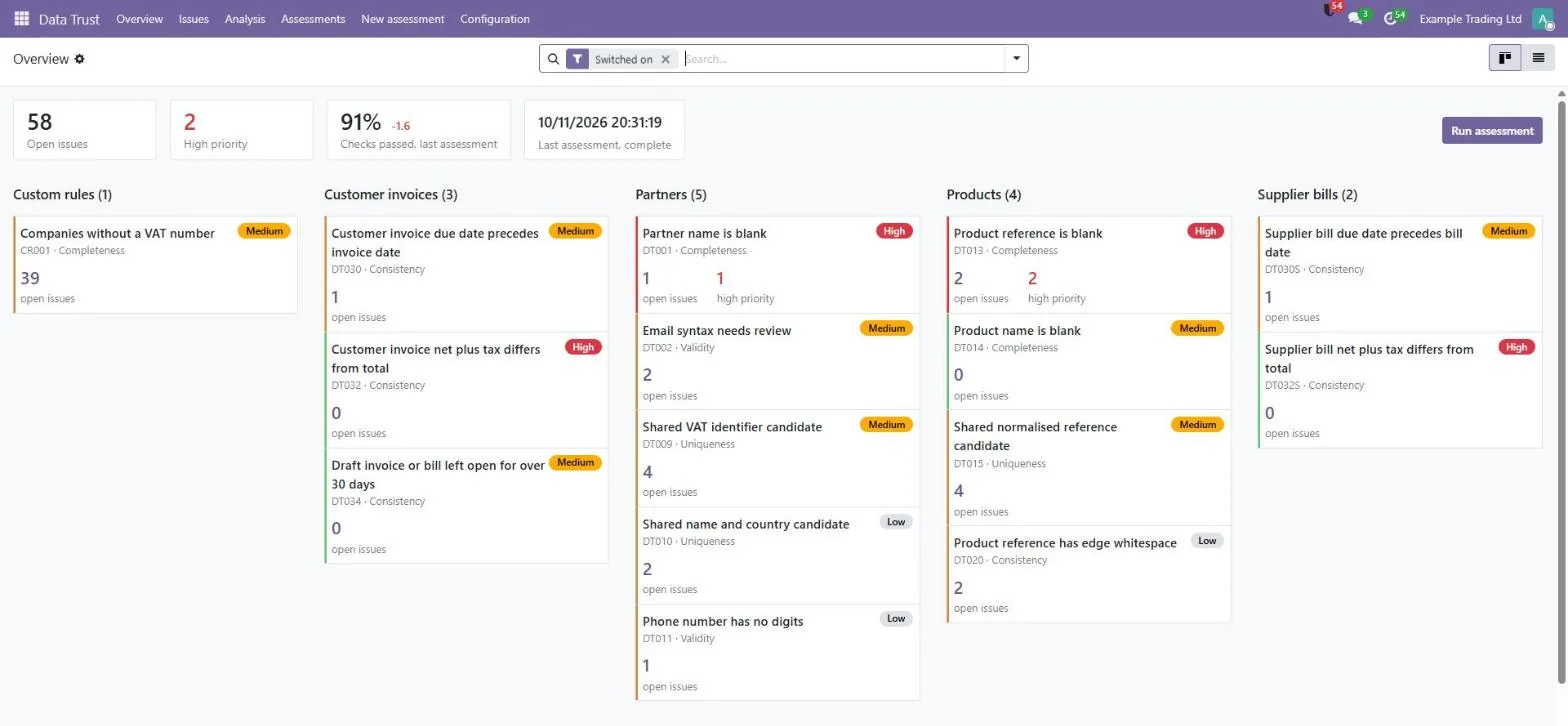
Open issues, high-priority issues, the pass rate from the last complete assessment and its change, last run status, and one card per check.

Controlled assessments

Batch reading with a time budget (300 s by default) and an optional row ceiling. One assessment at a time per company, each check in its own savepoint.

Issues workspace

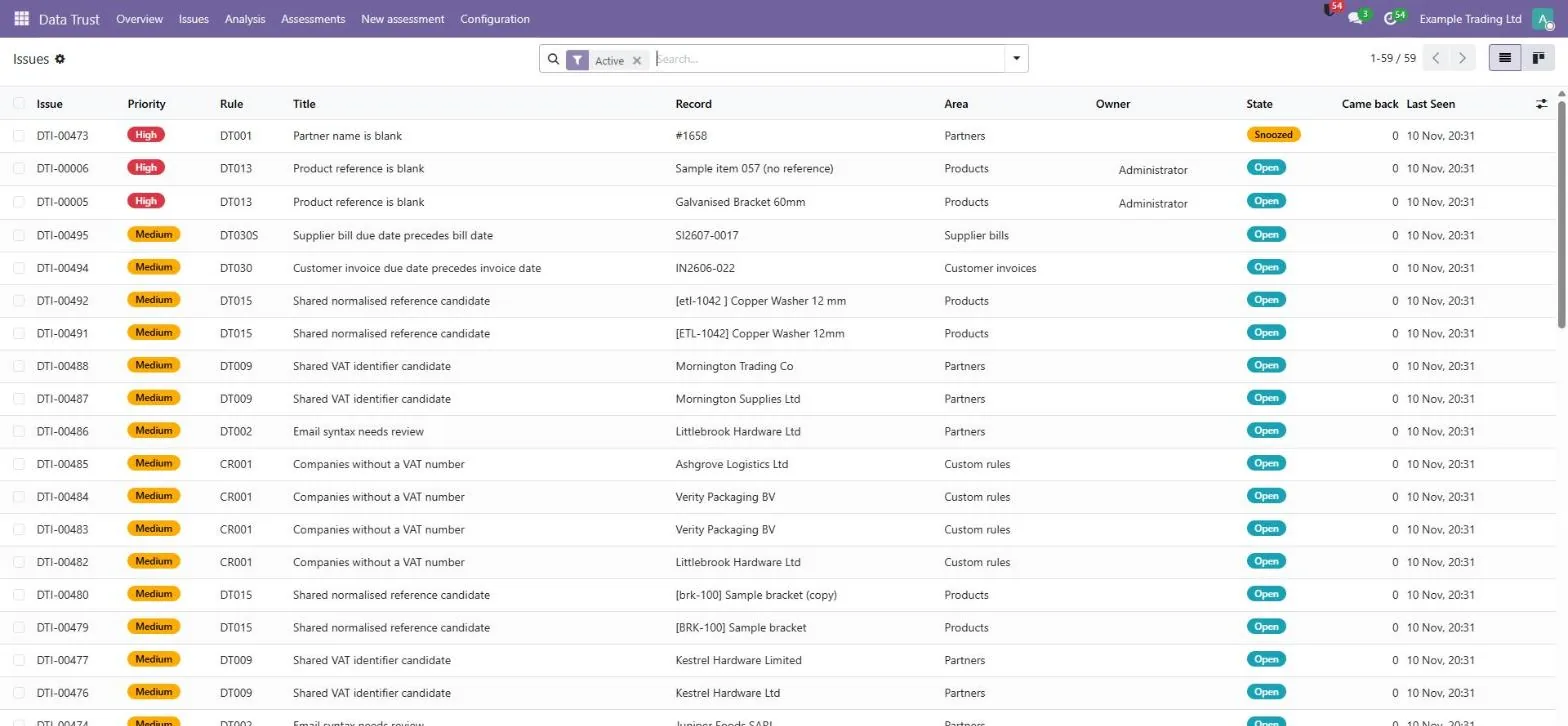
List and board views. Filters for unassigned, assigned to me, snoozed and came back; group by check, priority or owner; bulk assign and dismiss.

Issue form

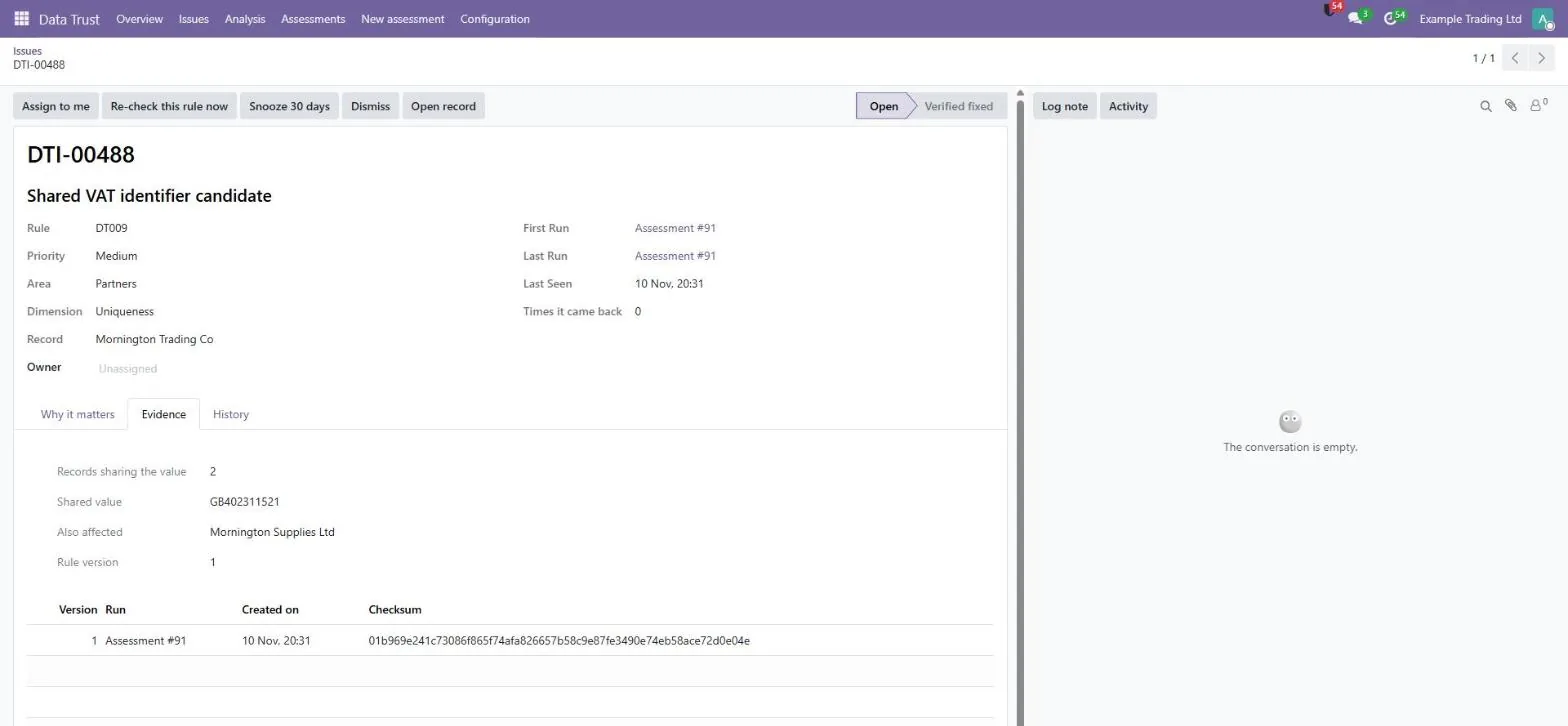
Why it matters, the recommended action, the affected record, priority, owner, state, evidence, history and internal notes, with Open record one click away.

Versioned evidence

The values that triggered a finding, stored as numbered versions with a checksum. A change adds a new version; nothing is overwritten. Bank numbers are masked.

Verified fixed means verified

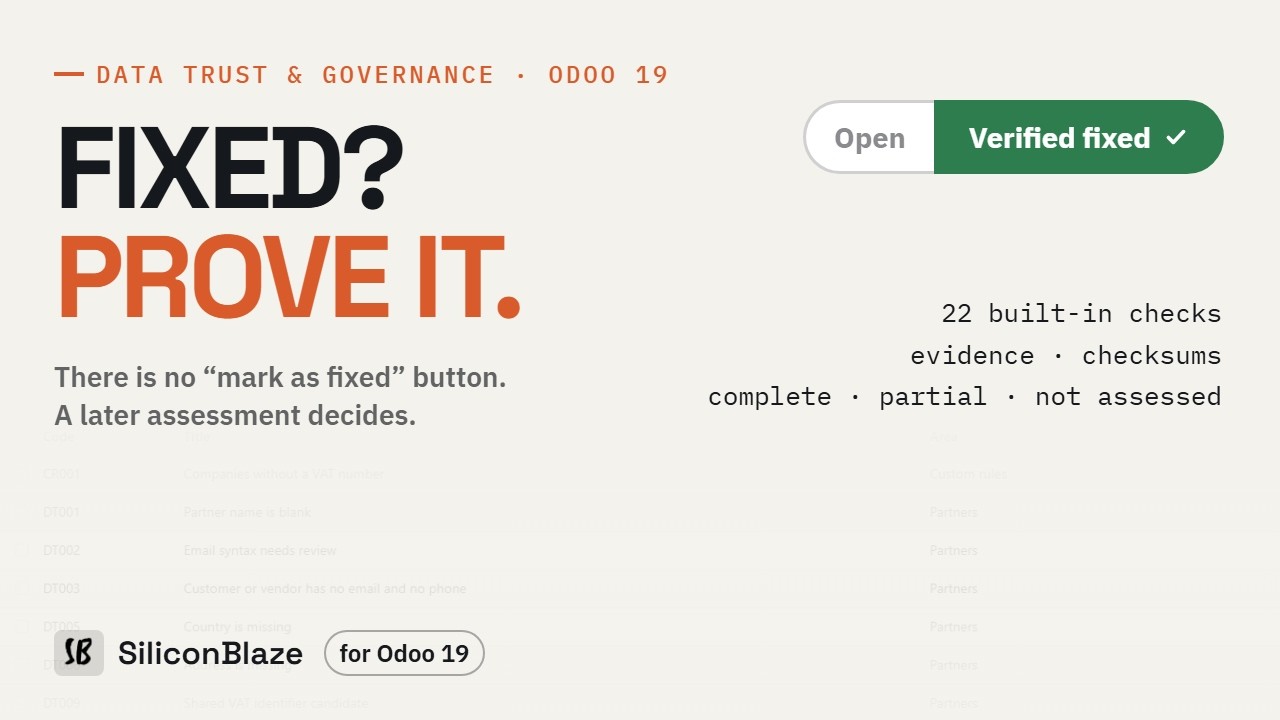
Nobody can click “Fixed”. A deleted record is reported as “record not found”, and an issue that comes back reopens with its history.

Custom rules

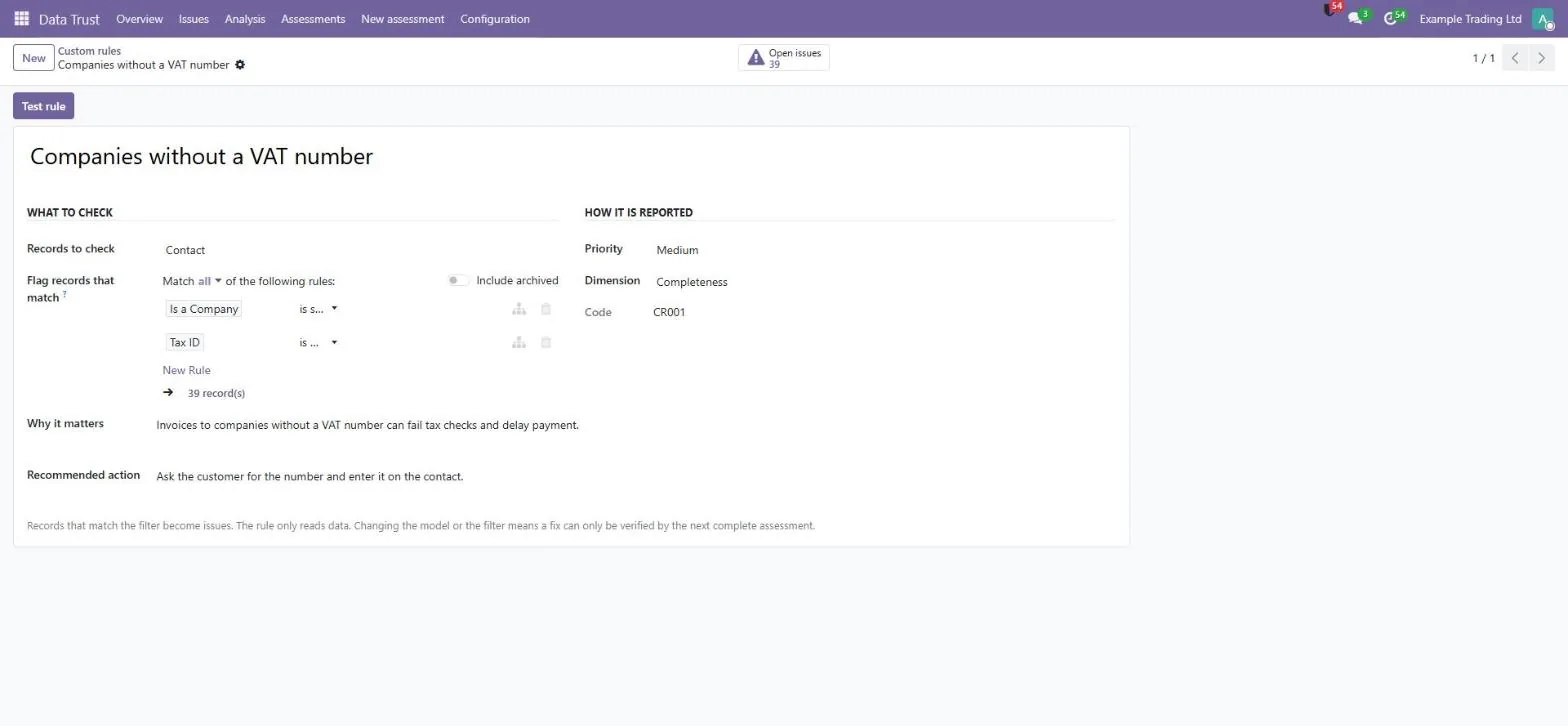
Pick a model, build the filter with Odoo's own domain editor and see how many records match before you save. Matches enter the same workflow.

Assessments and analysis

Every run with per-check state, rows read, rows flagged and a pass bar. Graph and pivot views show issues by rule and the trend over time.

One-click PDF summary

Records assessed, findings, new issues, open issues by priority and the highest-priority open issues. Partial runs are clearly marked.

Smart buttons on records

Partner and product forms show a Data Trust issues button when that record has issues, so users move between record and issue naturally.

Internal alerts, no email

Optional and off by default. After a complete assessment, a count-only summary goes to an internal Discuss channel for reviewers. No email is created.

Access levels and multi-company

Viewer, Reviewer, Run assessments and Configure. Issues, evidence, runs and history are separated per company, and rights are re-checked on the server.
The 22 checks

What it checks

Fixed, documented and deterministic. 14 checks are on by default; 8 optional ones depend on your data policy. Each issue shows why it matters and the recommended action.

CodeCheckPriority
Partners
DT001Name is blankHigh
DT002Email syntax needs reviewMedium
DT003Customer/vendor with no email and no phoneLow · optional
DT005Country is missingLow · optional
DT006Address is missingLow · optional
DT009Shared VAT number candidateMedium
DT010Shared name and country candidateLow
DT011Phone value has no digitsLow
Bank accounts
DT051IBAN fails structure or checksumHigh · optional
DT052Same bank account on several partnersHigh · optional
CodeCheckPriority
Products
DT013Internal reference is blankHigh
DT014Product name is blankMedium
DT015References differing only by case or spacesMedium
DT016Sellable product with zero sales priceLow · optional
DT020Reference has leading or trailing spacesLow
Invoices and bills
DT030Customer invoice due before invoice dateMedium
DT030SSupplier bill due before bill dateMedium
DT031Posted invoice dated far in the futureMedium · optional
DT032Invoice net + tax does not equal totalHigh
DT032SBill net + tax does not equal totalHigh
DT034Draft invoice or bill open over 30 daysMedium
DT036Posted customer invoice with zero totalLow · optional
Your own rules

Pick a model, build a filter with Odoo's domain editor, set priority, dimension, why it matters and the recommended action. See the match count before saving.

Prompts, not verdicts

A shared VAT number, name or bank account is a candidate for review, never proof of a duplicate. Email checks test syntax, IBAN checks test structure and checksum.

Currency-aware arithmetic

Net + tax = total uses each document's own currency rounding, so EUR, JPY and other currencies are handled correctly.

Every check ends in one honest state

No “trust score”. The pass rate is backed by real record-check counts and is a trend figure, not a guarantee.

Complete

The whole selected population was read. Only a complete check can verify a fix.

Partial

The time budget or row ceiling stopped the check. Never shown as clean.

Not assessed

The Odoo app, model or field the check needs is missing, for example Invoicing.

Failed

That one check hit an error. The other checks still run.

Screenshots

A tour of the app

Click any image to enlarge.

Data Trust & Governance for Odoo: open issues, high priority, pass rate and one card per check
Overview — open issues, high priority, pass rate and one card per check
Data Trust & Governance for Odoo: list with filters, grouping and bulk actions
Issues — list with filters, grouping and bulk actions
Data Trust & Governance for Odoo: versioned evidence with a checksum, and the review actions
Issue and evidence — versioned evidence with a checksum, and the review actions
Data Trust & Governance for Odoo: Odoo's filter editor with a live count of matching records
Custom rule — Odoo's filter editor with a live count of matching records

Built for your team

Who it is for

Companies already running Odoo 19 with real partners, products and invoices, from hundreds to tens of thousands of records.

Data owner / steward

Works the issues: assigns owners, snoozes, dismisses with a reason, restores and re-checks a rule after a fix.

Finance and accounting

Catches invoice and bill totals that don't add up, due dates before invoice dates, stale drafts, invalid IBANs and shared bank accounts.

Operations and sales

Keeps partner and product records complete and consistent, so quotes, deliveries and reminders reach the right place.

Odoo administrator

Chooses checks, builds custom rules, sets the time budget, switches on scheduled runs and alerts, and manages access levels.

Accountants and controllers

Get evidence, owners and a history of what was found and when it was verified, ready for reporting or a migration review.

Implementation partners

Use a repeatable, read-only data-quality routine for clients on Odoo.sh or on-premise, without touching business records.

Trust & security

Safe by design

A governance tool has to be governed itself. These are the rules it follows.

Read-only on business data

It reads Odoo records and writes only its own issues, evidence, history and runs. It never changes, merges or deletes a partner, product, invoice or bank account.

Honest results

Every check ends complete, partial, not assessed or failed. A partial check is never shown as clean and can never mark an issue fixed.

Append-only history

Evidence and history cannot be edited or deleted from the interface. Changing a rule raises its version, so old findings are re-evaluated honestly.

No email, ever

The module creates no email. Optional alerts go to an internal Discuss channel for reviewers only, with counts, not record values.

Nothing leaves your server

No AI, no external API, no activation server, no telemetry and no third-party Python library.

Safe custom rules

Technical and sensitive models (users, groups, mail, payment and more) cannot be selected, and invalid filters are rejected.

Quick start guide

From install to your first verified fix, without touching your data.

1

Get the app

Get it from the Odoo Apps store. On Odoo.sh it appears in your repository; on-premise, copy the datatrust folder into your addons path.

2

Install

Restart Odoo, enable developer mode, go to Apps → Update Apps List and install Data Trust & Governance. No configuration is needed to start.

3

Grant access

In Settings → Users, give Viewer, Reviewer, Run assessments or Configure. Grant Viewer deliberately: evidence can contain names and email addresses.

4

Choose checks

Review the 22 checks under Data Trust → Configuration → Checks and switch on the optional ones that fit your data policy.

5

Run your first assessment

Use New assessment or the run button on the Overview, then see which checks were complete, partial or not assessed.

6

Work the issues

Assign owners, open each record and fix it in Odoo. A later complete assessment marks the issue Verified fixed.

7

Add rules and schedule

Add custom rules for your own policies, and switch on the daily scheduled assessment and internal alerts when you are ready. Both are off until you turn them on.

Frequently asked questions

Will it change my data?

No. It only reads your business records. It writes its own issue, evidence, history and assessment records, and nothing else.

Does it fix or merge records automatically?

No. It finds problems, assigns them and verifies the fix. People correct the record in Odoo, and a later complete scan confirms it.

When is an issue verified fixed?

Only when a later complete assessment, with the same enabled checks and the same rule version, shows that the record still exists and no longer fails the check. A deleted record is reported as “record not found”.

Will it email my customers or staff?

No. The module creates no email. Optional alerts go to an internal Discuss channel for users with the Reviewer right or higher.

Can I add my own checks?

Yes. Administrators build rules on one model with Odoo's domain editor and see how many records match before saving. Cross-record joins and regular expressions are not provided yet.

Is a shared VAT number a duplicate?

Not necessarily. Shared VAT numbers, names and bank accounts are prompts for review, because group companies can legitimately share them. Nothing is merged.

Does it use AI or send data outside?

No. The checks are fixed, deterministic rules plus your own rules. There are no outside calls, no telemetry and no activation key.

How long does an assessment take?

In our development benchmark, about 11,000 new partner and product records producing about 8,500 issues took about 193 seconds. On large databases set a time budget; a check that cannot finish is reported as partial.

Which Odoo versions and hosting are supported?

Odoo 19, tested on Community. It runs on Odoo.sh and on-premise. It cannot be installed on Odoo Online (SaaS), because third-party Python apps are not allowed there.

Requirements

Runs on Odoo 19 hosted on Odoo.sh or on your own server. Not available on Odoo Online (SaaS).

Odoo
19.0
Edition
Community (tested)
Hosting
Odoo.sh or on-premise
Required apps
Discuss, Contacts, Products
Optional
Invoicing (invoice and bill checks)
Database
PostgreSQL
Languages
EN · ES · FR · DE · IT
External services
None
Licence
OPL-1

Tested on Odoo 19 Community. Interface translations are vendor translations, not yet reviewed by native speakers. Also available for Dolibarr.

Find the issue. See the evidence.
Verify the fix.

The Odoo Apps listing and price will be published here at launch. Questions before then? Write to us.

More from SiliconBlaze

More Odoo apps and modules

Built to work side by side on the same Odoo data. See all Odoo work →