Odoo App v19.0.1.0.0 Odoo 19 · Odoo 20 Odoo.sh · On-premise 9 languages

Procurement Intelligence for Odoo Purchase Planning, Smart Reordering & Vendor Rating

Know what to buy, from whom, how much and by when. It reads your orders, stock, incoming receipts and vendor price lists, tells your buyers what to order today, and shows the calculation behind every number. Draft RFQs only: nothing is sent to vendors.

4
urgency levels by buy-by date
1 click
draft RFQs per vendor
9
languages
0
e-mails sent to vendors
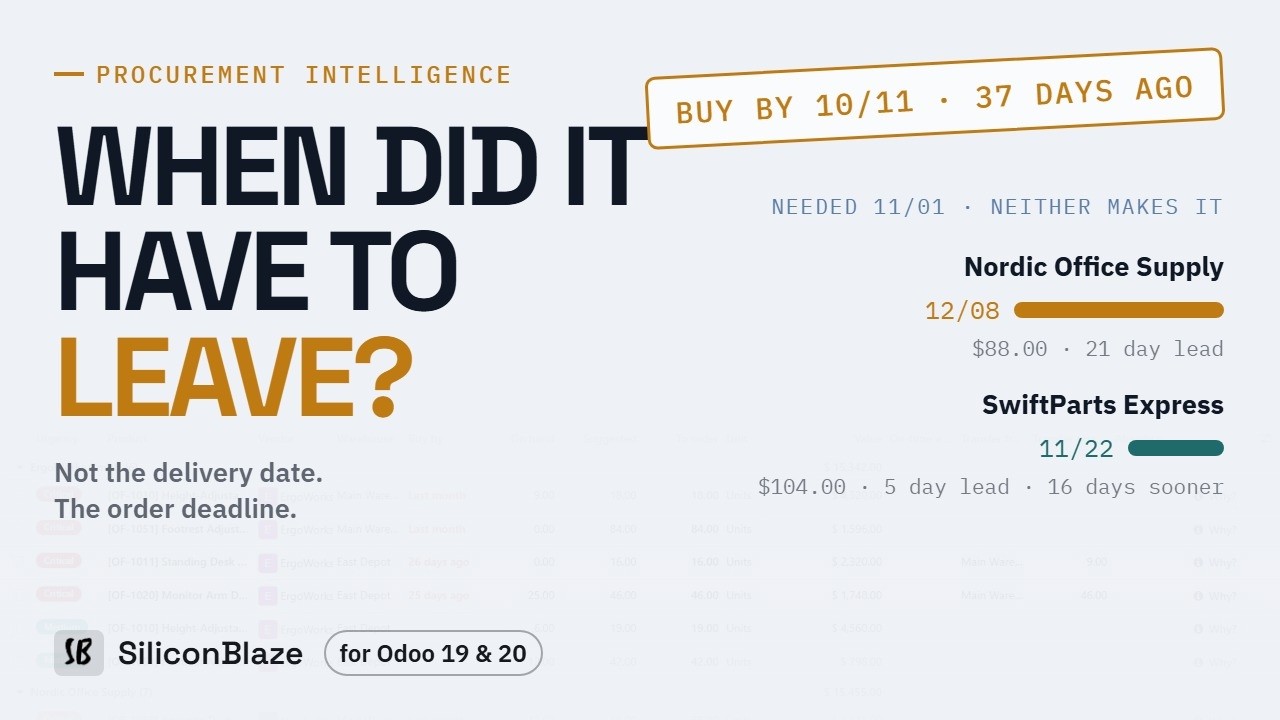
Watch the full demo

Procurement Intelligence for Odoo demo video Watch on YouTube ↗

The Overview, Order Now, “Why this quantity?”, draft RFQs, transfers, the reorder policy and vendor performance.

Why businesses need it

Buying on gut feeling costs twice

Too late and you lose the sale; too much and the cash sits on a shelf. Odoo's reordering rules don't tell a buyer why a quantity is what it is.

Ordered too late

The order went out after the day it had to, so the goods arrive after the customer needed them. Nobody saw the buy-by date coming.

Ordered too much, or from the wrong place

Stock piles up while another warehouse already holds what you need, and the vendor's minimums and pack sizes are worked out by hand.

Numbers nobody can check

A suggested quantity with no explanation gets overridden or ignored. Buyers go back to spreadsheets because they can't see why.

How it works

From open orders to a draft RFQ

The app prepares; your buyers decide. Every suggestion can be checked, changed or postponed.

1

Read your data

Open sales and manufacturing orders, stock on hand, incoming receipts and vendor price lists, per company and warehouse.

2

Plan

Demand due within the vendor lead time, minus stock, minus incoming. Vendor minimums, price breaks and whole packs applied.

3

Rank

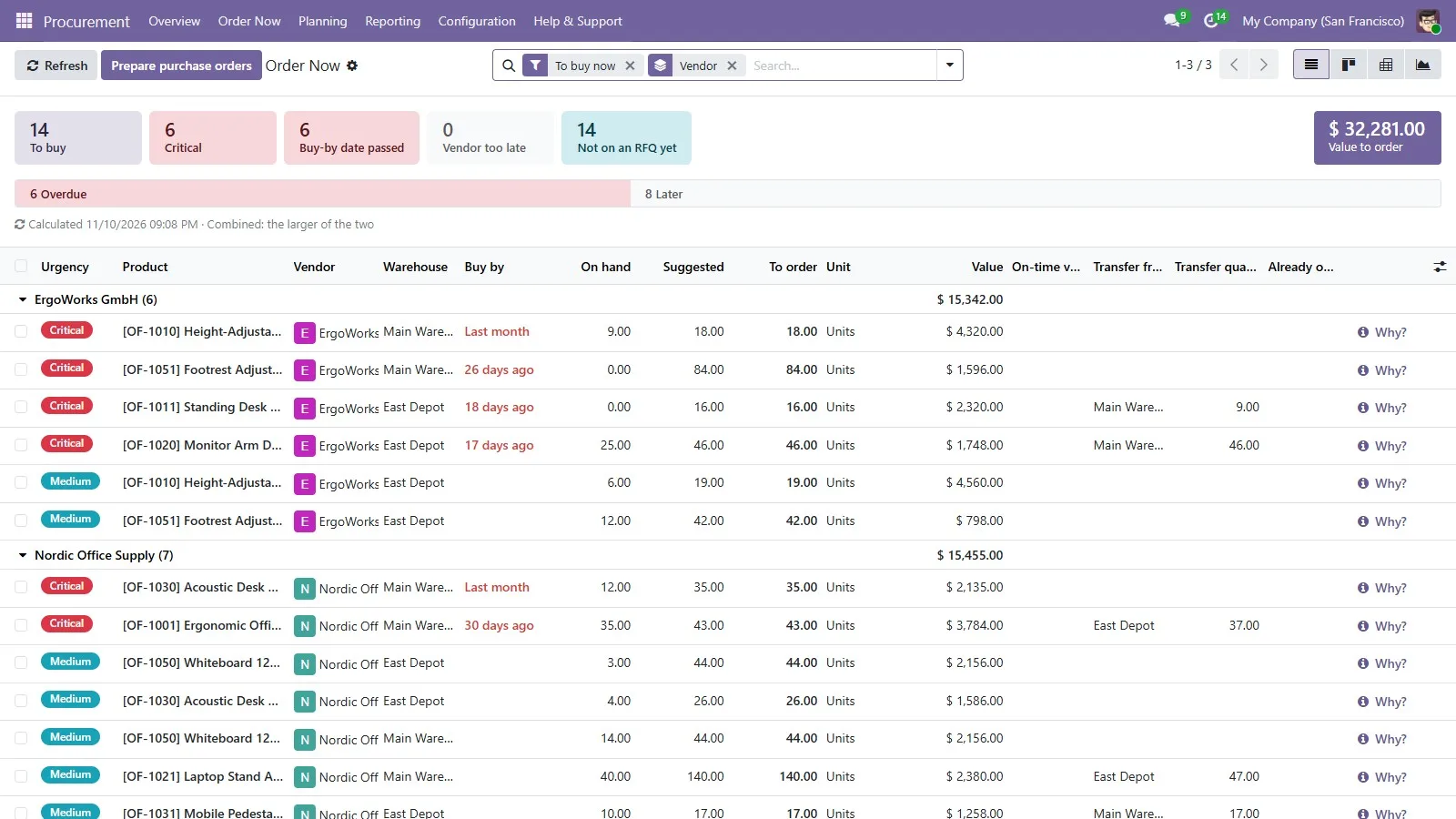
Order Now lists every product to buy, Critical / High / Medium / Low, by the buy-by date: the day the order must go out.

4

Explain

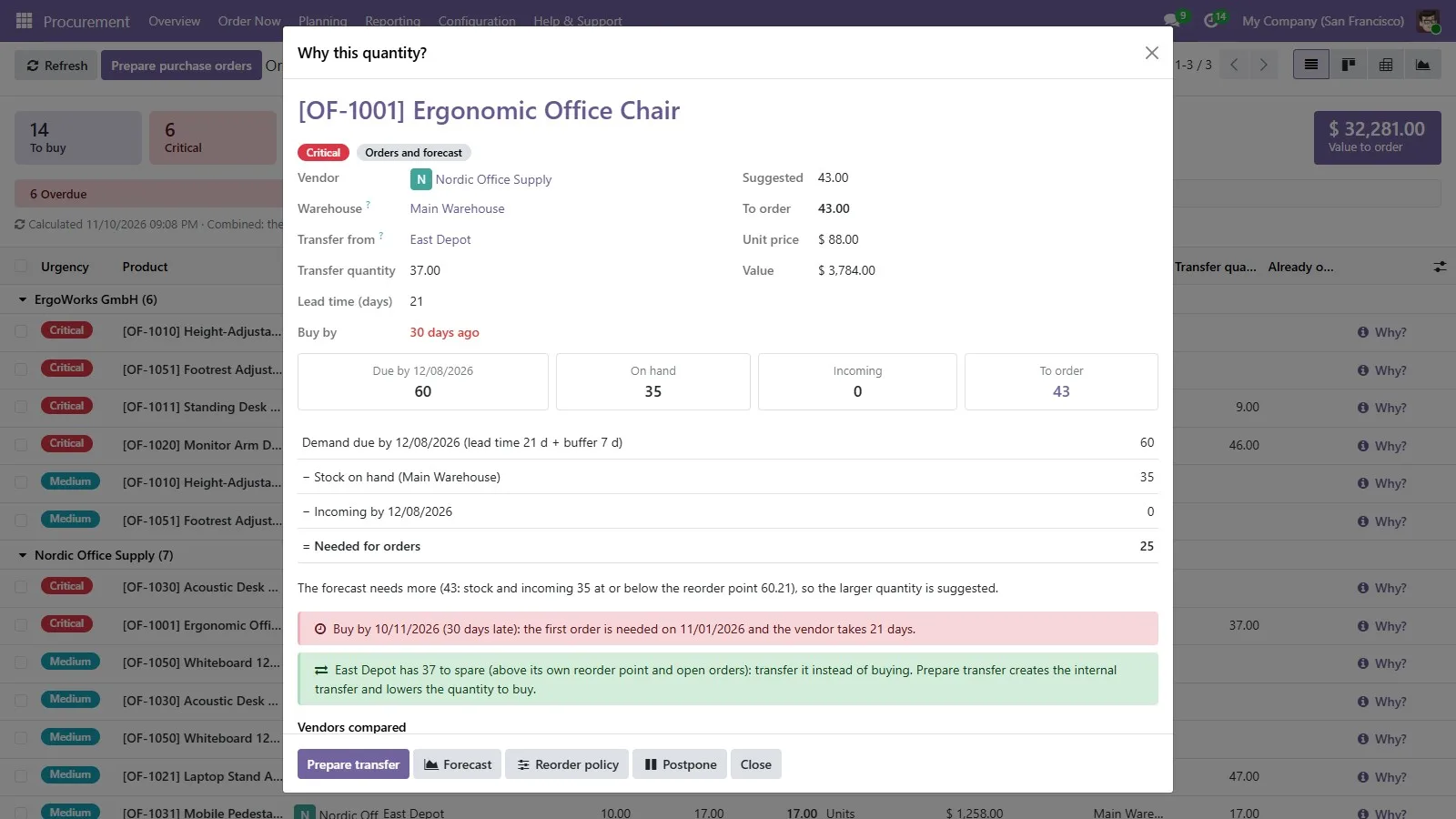
“Why this quantity?” on every line shows the calculation and the orders behind it, one click from the documents.

5

Prepare

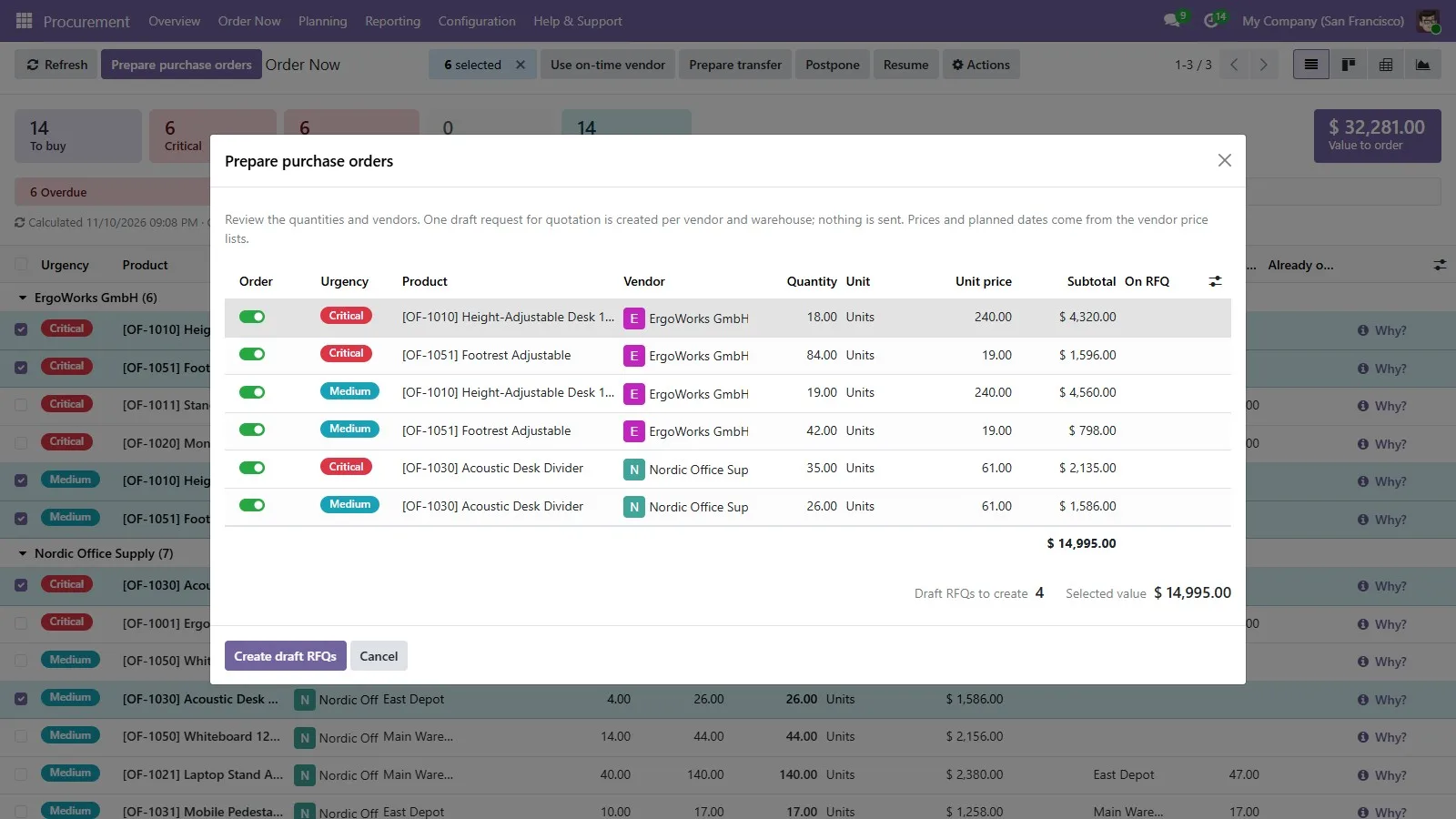
One draft RFQ per vendor and warehouse, or an internal transfer from another warehouse. Nothing is sent to vendors.

Features

Built into Odoo, not bolted on

Odoo's own lists, kanban, pivot, graph, filters and smart buttons. Nothing new to learn.

Overview

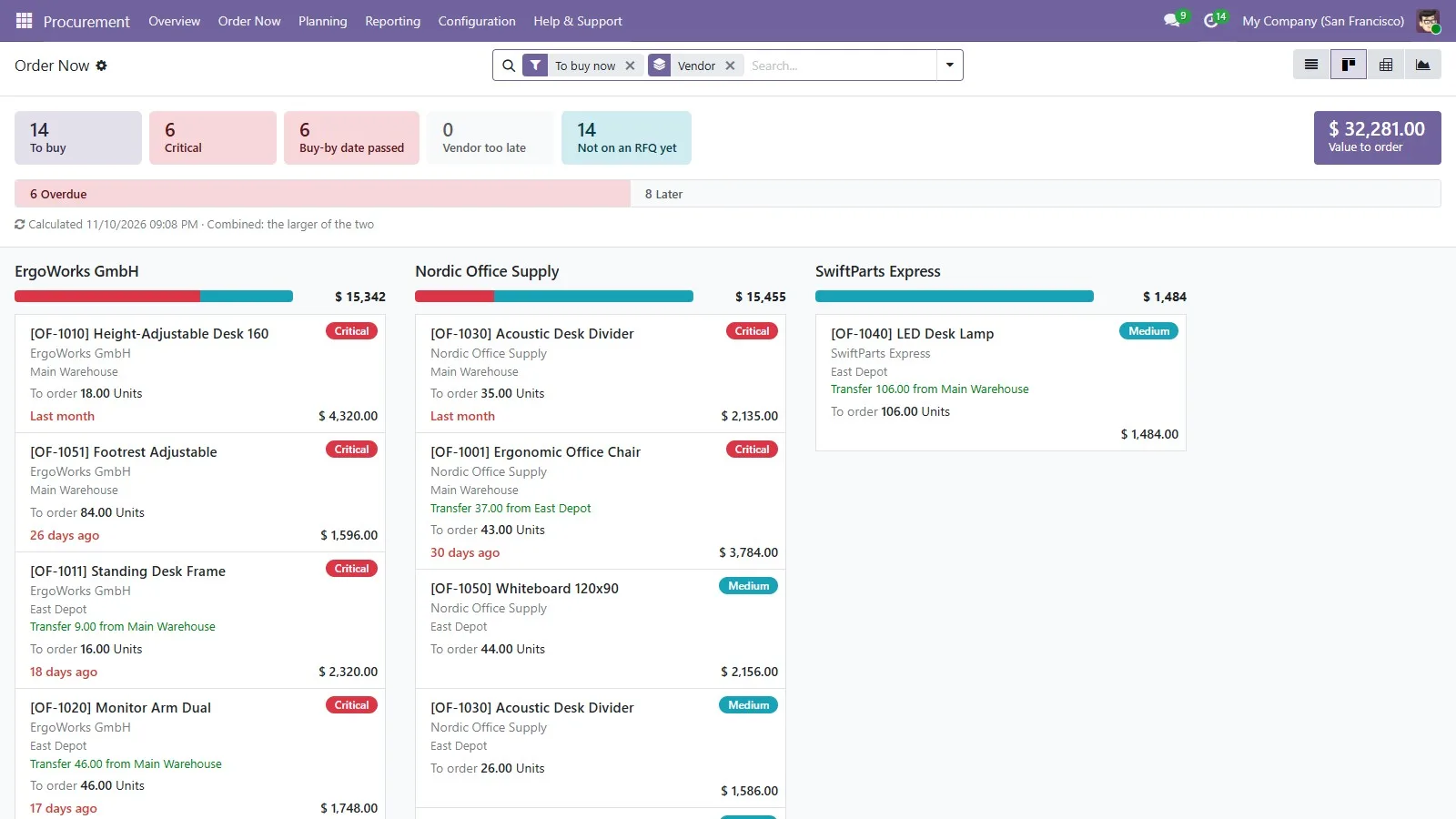
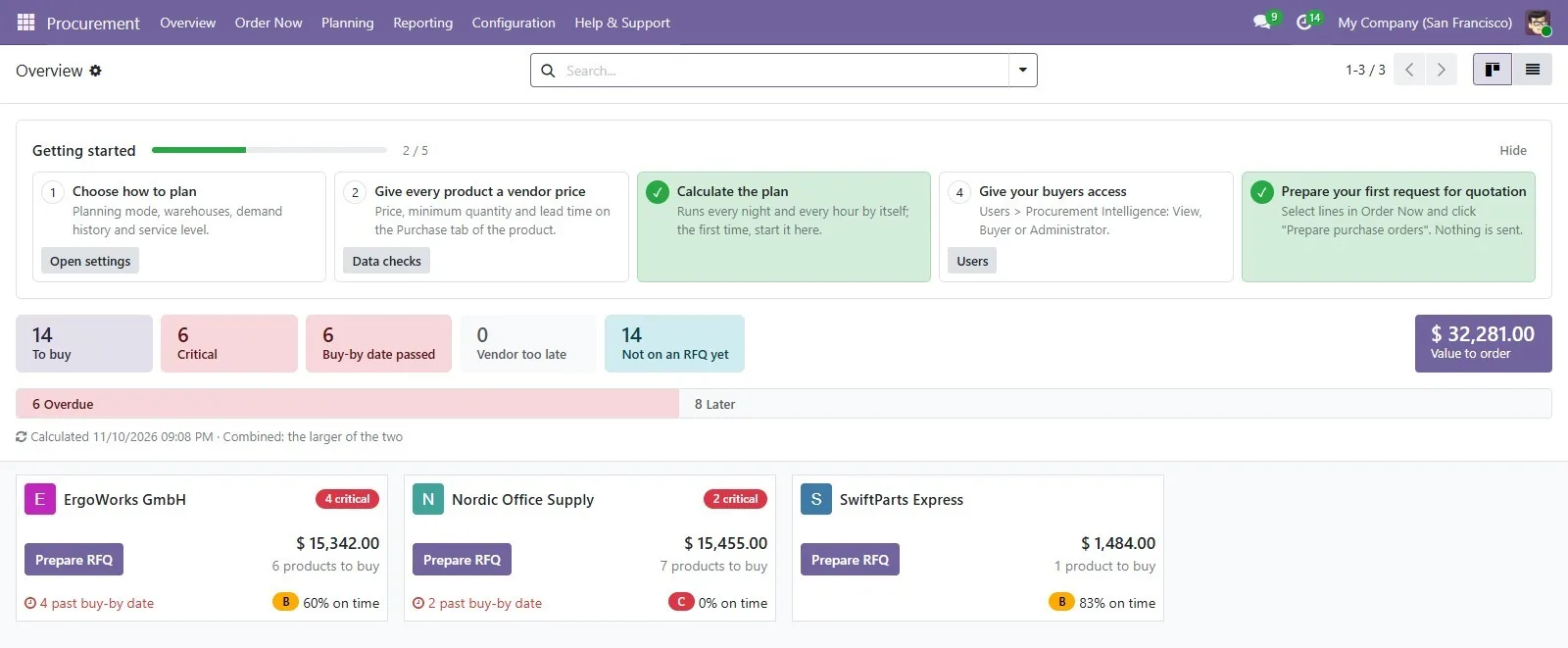
One card per vendor with the products to buy, urgency, value, first buy-by date and delivery rating. A banner counts critical, overdue and late-at-vendor items.

Order Now

Every product to buy, ranked by buy-by date. Plan from confirmed demand, forecast, or both (the larger of the two, never the sum). Also as cards on phones.

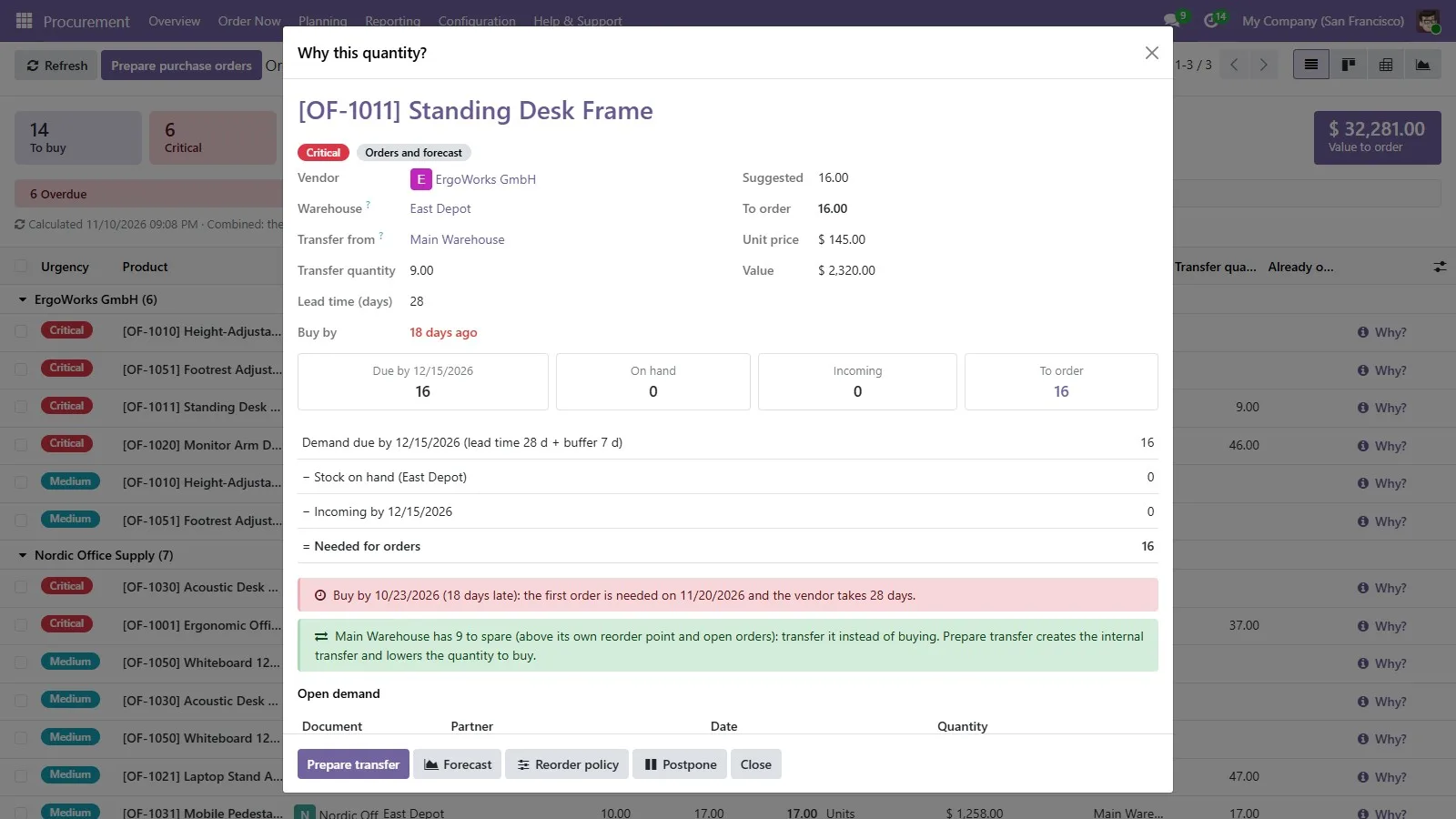
“Why this quantity?”

Demand due in the window, minus stock, minus incoming, equals what to order. The sales and purchase orders behind the number open in one click.

Vendors compared

Price for the quantity, lead time, arrival date and on-time rating side by side. “Use on-time vendor” shows the extra cost when the cheapest is too late.

Draft RFQs in one step

One draft request for quotation per vendor and warehouse. Products already on an open RFQ are flagged and left unticked, so nothing is ordered twice.

Transfer before you buy

Stock another warehouse can spare, above its own reorder point and open orders, is proposed as an internal transfer in one click.

Reorder policy

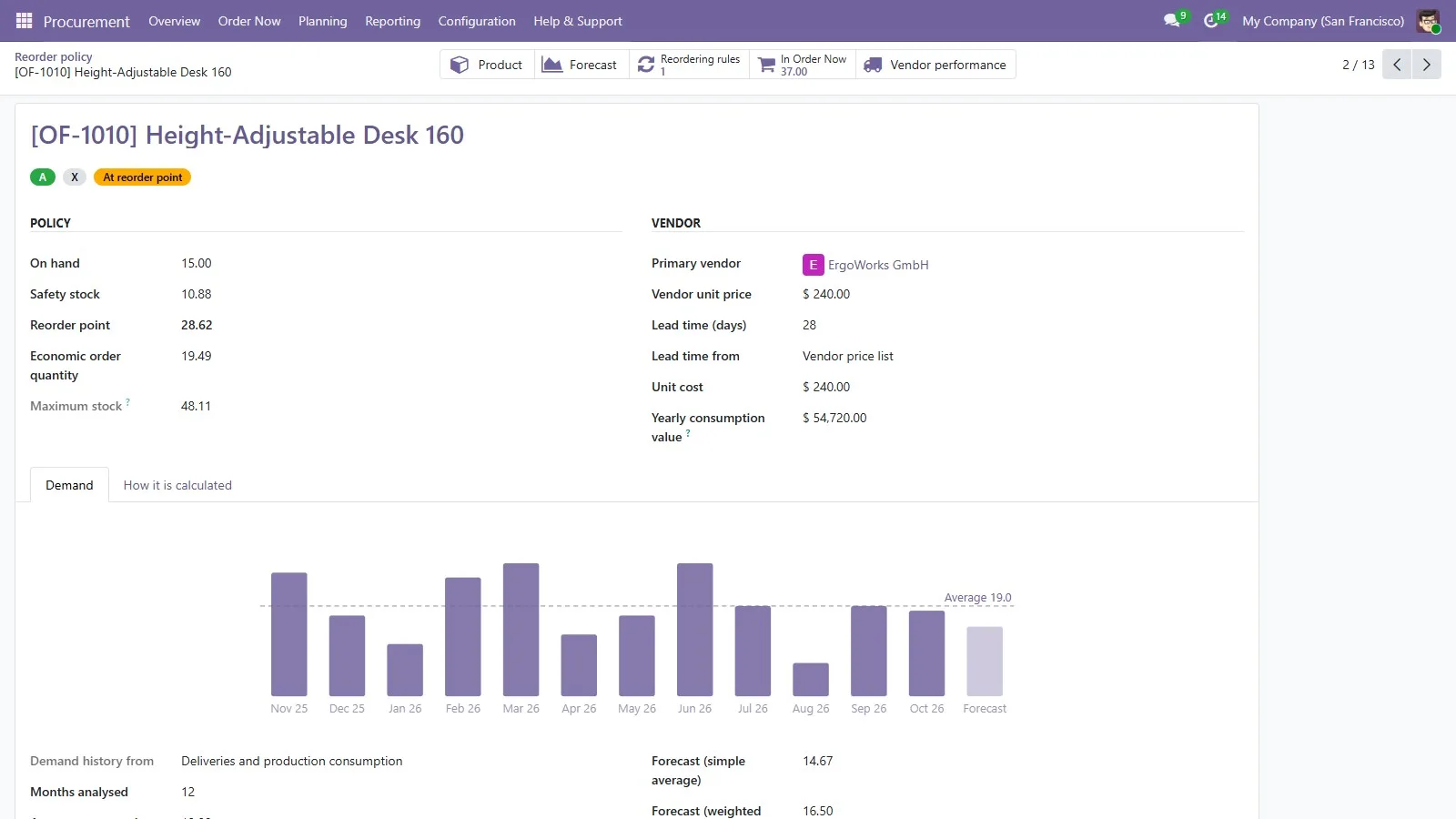
Safety stock from your service level and demand variability, reorder point and economic order quantity, each with its formula and inputs. Optional seasonality.

Apply to reordering rules

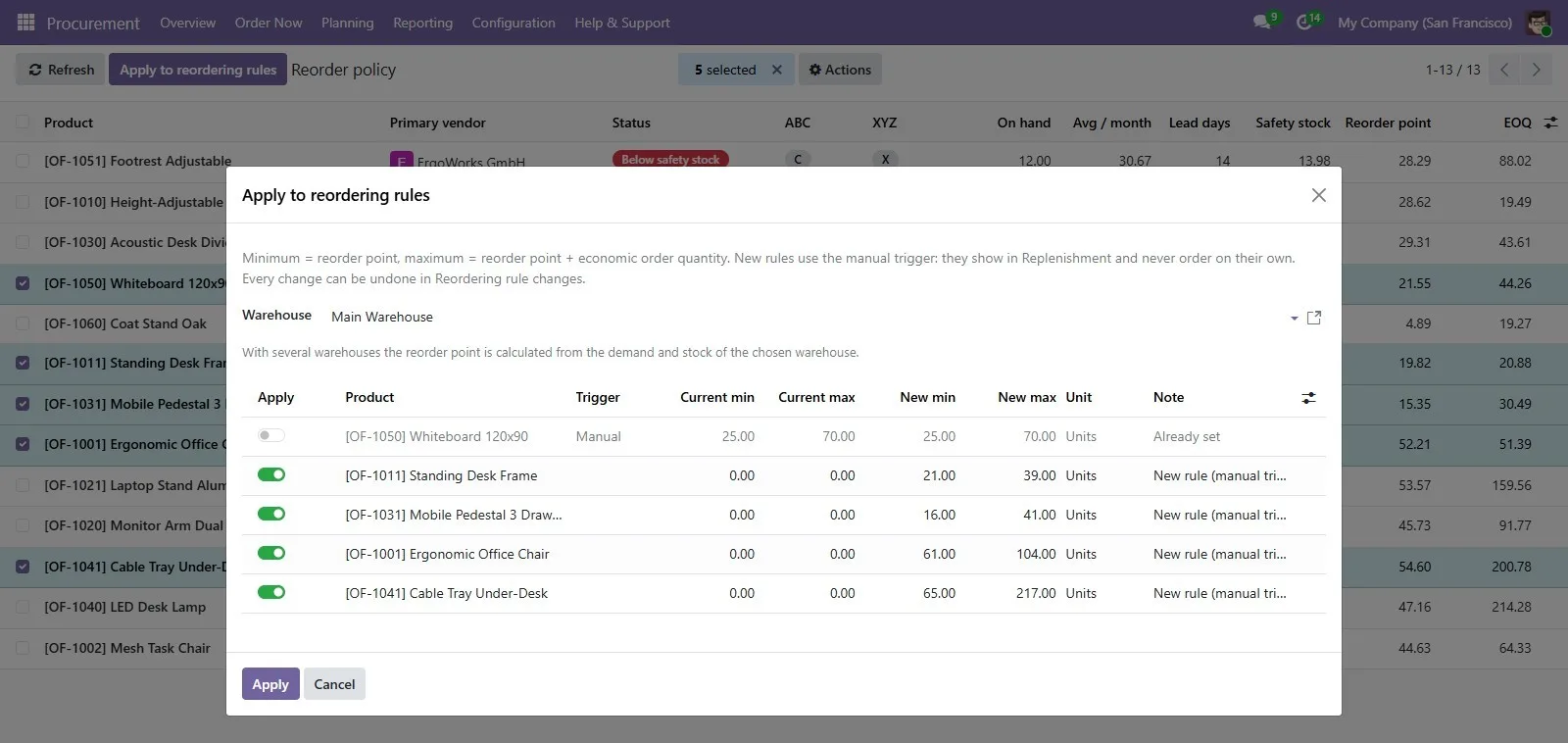
Write the reorder point and order quantity into Odoo's own reordering rules after a preview. Every change is logged and can be undone.

Planned demand

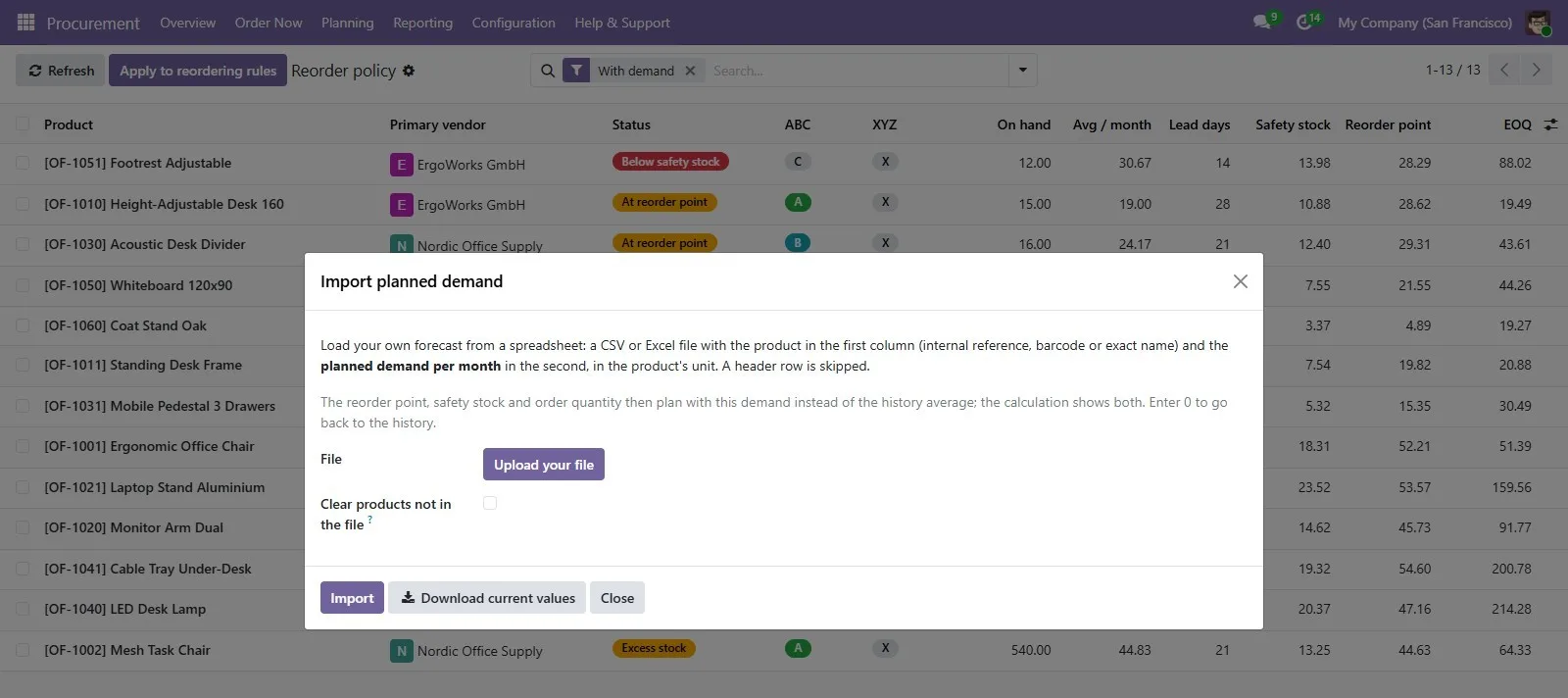
For new products, contracts or promotions: set demand per month by hand or import it from a CSV or Excel sheet.

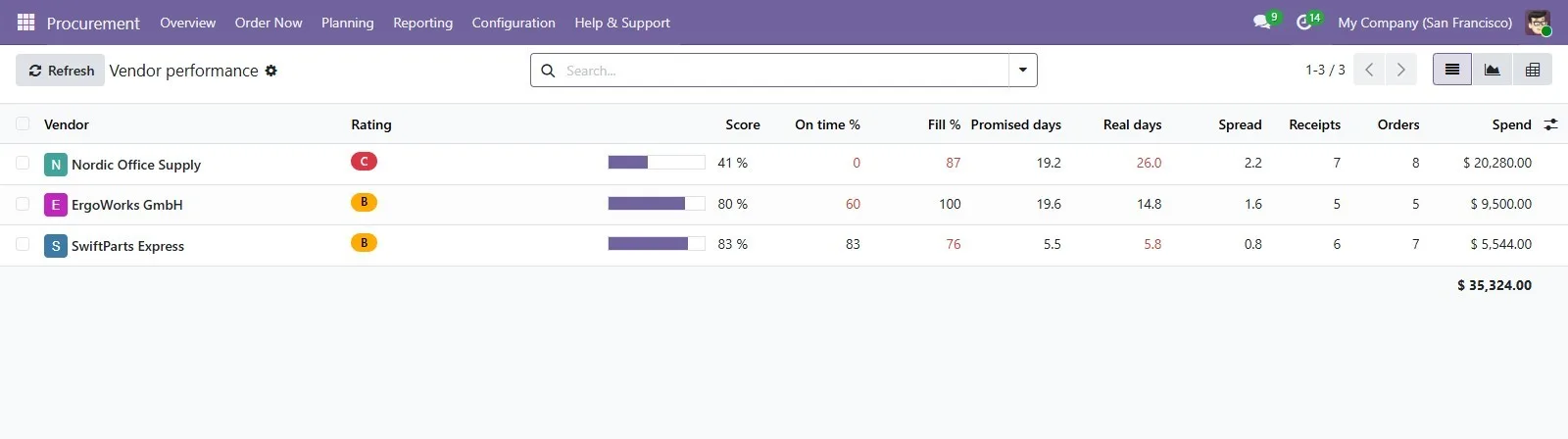
Vendor performance

Scorecards from real receipts: on-time rate, fill rate, promised and real lead time, spend, and an A / B / C rating from 3 receipts.

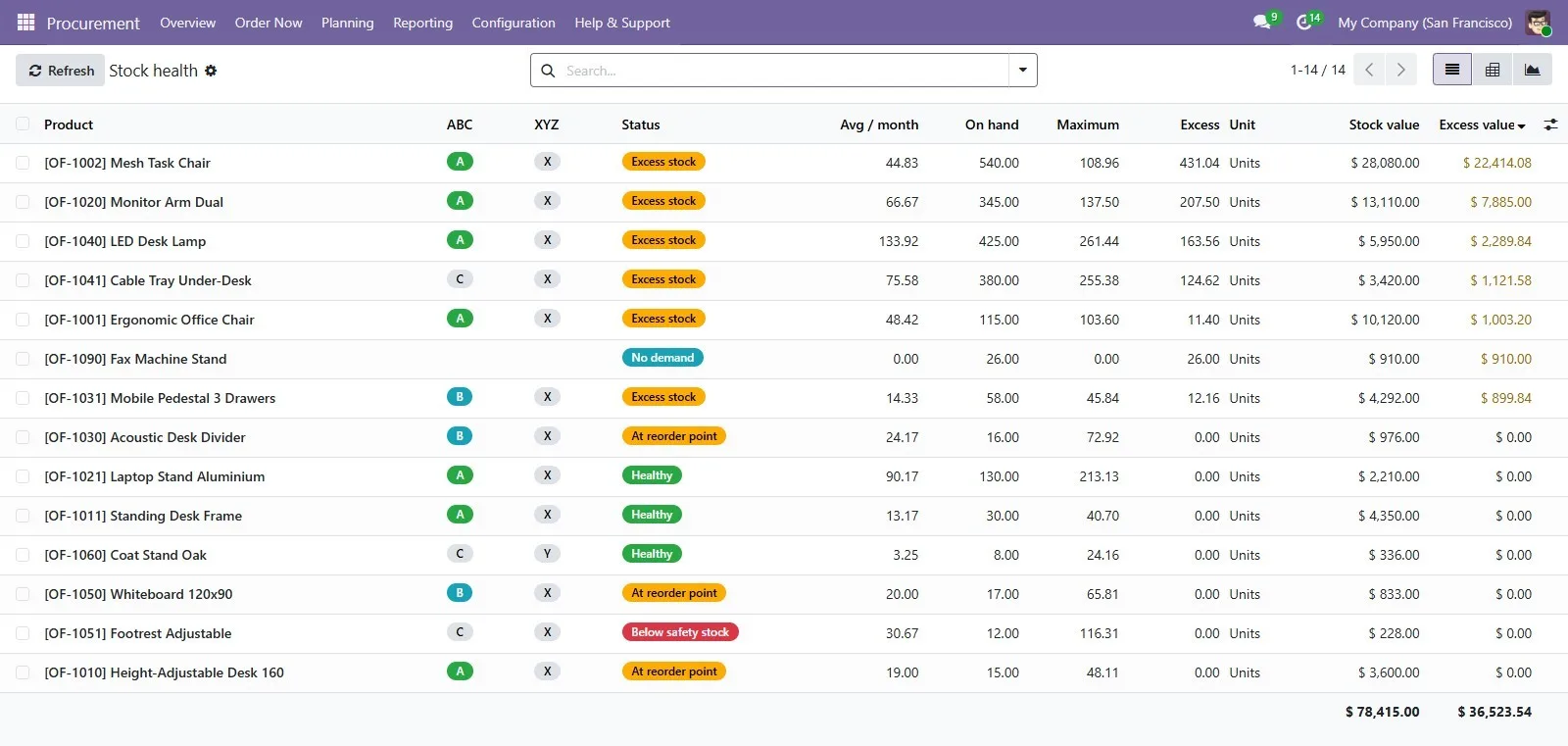
Stock health and data checks

ABC/XYZ classes, excess and dead stock with their value; products missing a vendor price, lead time or cost, each with a Fix button.

Optional e-mail digest

A daily or weekly Order Now summary for the users you choose, with a preview first. Off by default and never sent to vendors.

Order Now

One list, ranked by urgency

Recalculated every hour, or whenever you press Recalculate.

Buy-by date

The day the order must go out so the goods arrive in time. Critical / High / Medium / Low follow from it.

Nets what you have

Stock on hand and incoming receipts are subtracted, per warehouse if you plan warehouses separately.

Vendor rules

Minimum quantities, price breaks and whole packs: a vendor selling boxes of 6 gets 90, not 85.

Buyer edits kept

A quantity a buyer changes is kept when the plan is recalculated.

Postpone

Postpone a line until a date with a reason. It stays up to date and comes back by itself.

Bills of materials

Optional, with Manufacturing: products you make are planned as production, components through every level.

Screenshots

A tour of the app

Fictional demo data (an office-furniture company). Click any image to enlarge.

Procurement Intelligence for Odoo: one card per vendor, urgency counts and the buy-by timeline
Overview — one card per vendor, urgency counts and the buy-by timeline
Procurement Intelligence for Odoo: every product to buy, ranked Critical / High / Medium / Low
Order Now — every product to buy, ranked Critical / High / Medium / Low
Procurement Intelligence for Odoo: the calculation, the transfer option and the documents behind it
Why this quantity? — the calculation, the transfer option and the documents behind it
Procurement Intelligence for Odoo: one draft request for quotation per vendor and warehouse
Prepare RFQs — one draft request for quotation per vendor and warehouse
Procurement Intelligence for Odoo: safety stock, reorder point and EOQ with their formulas
Reorder policy — safety stock, reorder point and EOQ with their formulas
Procurement Intelligence for Odoo: grouped by vendor or urgency, also on phones
Order Now as cards — grouped by vendor or urgency, also on phones
Procurement Intelligence for Odoo: on-time rate, fill rate, real lead time and A / B / C rating
Vendor performance — on-time rate, fill rate, real lead time and A / B / C rating
Procurement Intelligence for Odoo: ABC/XYZ classes, excess and dead stock with their value
Stock health — ABC/XYZ classes, excess and dead stock with their value
Procurement Intelligence for Odoo: an internal transfer from a warehouse that can spare stock
Transfer before you buy — an internal transfer from a warehouse that can spare stock
Procurement Intelligence for Odoo: import demand per month from a CSV or Excel sheet
Planned demand — import demand per month from a CSV or Excel sheet
Procurement Intelligence for Odoo: current and new values side by side before applying
Apply to reordering rules — current and new values side by side before applying
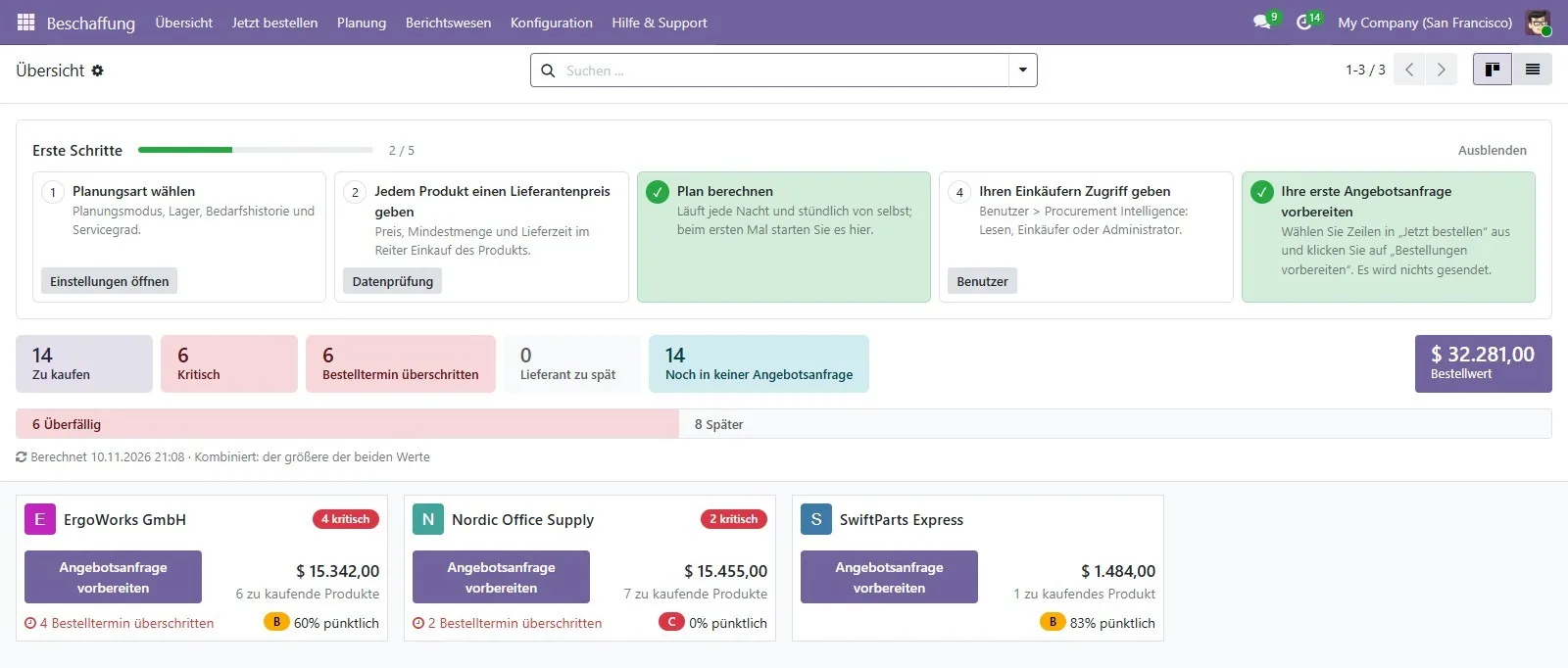
Procurement Intelligence for Odoo: every screen in nine languages, including Arabic right to left
In German — every screen in nine languages, including Arabic right to left

Built for your team

Who it is for

Companies on Odoo 19 or 20 with Purchase, Inventory and Sales, buying from several vendors.

Buyers and purchasing teams

Start the day in Order Now: what to buy, from whom and by when, then create draft RFQs in one step.

Purchasing managers

See urgency per vendor, check every quantity with “Why?”, and rate vendors on real receipts instead of promises.

Inventory and warehouse managers

Transfer before buying, keep reordering rules in line with real demand, and find excess and dead stock.

Manufacturers

With Manufacturing installed, components are planned through every level of the bill of materials.

Wholesalers and distributors

Many products, several vendors and warehouses, vendor minimums and pack sizes handled for you.

Odoo partners and administrators

Native views, three access levels, a Help & Support page and “Copy diagnostic information” for support.

Trust & safety

Safe by design

It prepares the work; people approve it.

Draft RFQs only

It never sends anything to a vendor. You check and send RFQs in Purchase, and validate transfers in Inventory, as usual.

Every number explained

Every quantity and every policy value shows its formula and inputs, so it can be checked by hand.

Changes you can undo

Reordering-rule changes are previewed, logged with who applied them, and can be undone. New rules use the manual trigger.

Your data stays in your database

No external service, no activation key and no extra Python packages.

No surprise e-mails

The optional digest goes only to your own users, is off by default and shows a preview first.

Access levels and multi-company

View, Buyer and Administrator. Multi-company and multi-warehouse, with prices in the company currency.

Quick start guide

Up and running in minutes, guided by the Getting started checklist.

1

Install the app

Get it from the Odoo Apps store for your Odoo version (19 or 20). On-premise, copy the folder into your addons path, update the Apps list and install. No extra Python packages.

2

Follow Getting started

The checklist on the Overview walks you through settings, vendor prices, the first calculation, buyer access and the first RFQ.

3

Check your data

Reporting → Data checks lists products without a vendor price, lead time or cost, each with a Fix button.

4

Work Order Now

Review the ranked list, open “Why?” where needed, adjust quantities or vendors, then Prepare RFQs.

5

Tune the policy

Review safety stock and reorder points, add planned demand, and apply them to Odoo's reordering rules after a preview.

Frequently asked questions

Does it send anything to my vendors?

No. It prepares draft requests for quotation and internal transfers. You check and send or validate them in Purchase and Inventory as usual.

Does it replace Odoo's reordering rules?

No, it works next to them. Order Now plans from orders and forecast; “Apply to reordering rules” can write its reorder point into Odoo's rules after a preview, and every change can be undone.

Why is a product missing from Order Now?

Usually its stock and incoming receipts already cover the demand, or the line is postponed, or the product is archived. The reorder policy shows the calculation of every product, and the Help & Support page lists the checks.

Can a buyer change the suggested quantity?

Yes. The quantity to order is editable, and a changed quantity is kept when the plan is recalculated.

How much history does it need?

It uses the complete months you have, up to the number set in the settings (12 by default). New products can be planned with a planned demand per month.

How often is the plan updated?

Order Now is recalculated every hour; the reorder policy, vendor performance and data checks every night. You can also recalculate on demand.

Which Odoo versions and hosting are supported?

Odoo 19 and Odoo 20 (buy the version of your database), on Odoo.sh or on-premise. It cannot be installed on Odoo Online (SaaS), because Odoo does not allow third-party apps with Python code there.

What happens if I uninstall it?

It removes its own menus, tables, settings and scheduled jobs. Your products, orders, reordering rules and transfers stay.

How much does it cost?

129 EUR, a one-time purchase through the Odoo Apps store.

Requirements

Runs on Odoo 19 or 20 hosted on Odoo.sh or on your own server. Not available on Odoo Online (SaaS).

Odoo
19.0 and 20.0
Edition
Community
Hosting
Odoo.sh or on-premise
Required apps
Purchase, Inventory, Sales
Optional
Manufacturing (bills of materials)
External services
None
Languages
EN · FR · DE · ES · IT · NL · PT-BR · AR · ZH
Licence
OPL-1
Price
129 EUR

Purchase, Inventory and Sales are all included in Odoo Community. Uninstalling keeps your products, orders, reordering rules and transfers. Also available for Dolibarr.

What to buy, from whom,
how much and by when.

Procurement Intelligence for Odoo 19 and 20: 129 EUR, one-time, through the Odoo Apps store. The store link will be added here at launch. Questions? Ask us.

More from SiliconBlaze

More Odoo apps and modules

Built to work side by side on the same Odoo data. See all Odoo work →