Odoo App v19.0.1.12.0 Odoo 19 · Community & Enterprise Odoo.sh · On-premise 7 languages

Profit Leakage Control for Odoo Unbilled Deliveries, Duplicate Vendor Bills & Payment Protection

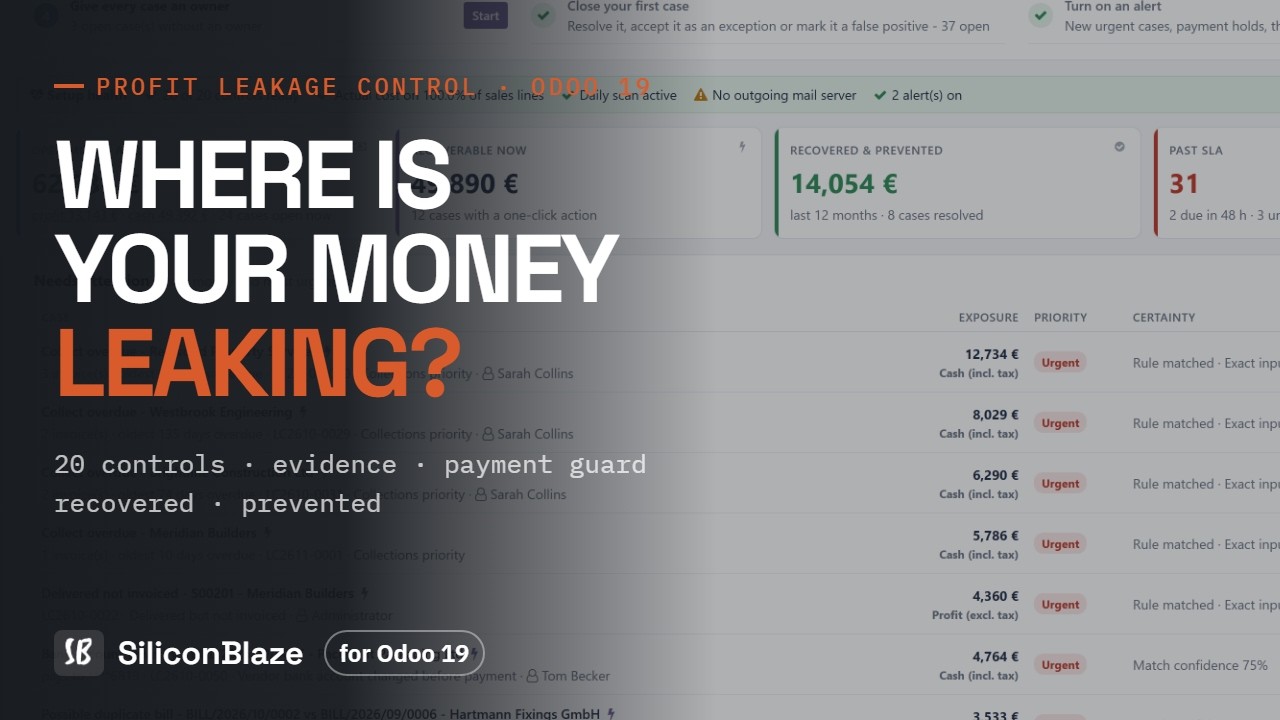
20 scheduled controls find unbilled deliveries, duplicate vendor bills, changed bank accounts, margin leaks and overdue cash. Every euro at risk becomes a case with the amount, the evidence, an owner and a fix, and every outcome is measured.

20
financial controls
3
case outcomes
7
languages
0
documents changed by scans

Watch the full demo

Profit Leakage Control for Odoo demo video Watch on YouTube ↗

The dashboard, a case with its evidence, Payment Guard, root causes, working capital and the results.

Why businesses need it

Profit leaks quietly, between your documents

Odoo records every delivery, bill and payment. It does not tell you where profit and cash are slipping away. Each leak is small and invisible in standard reports; together they add up.

Deliveries nobody invoiced

Goods leave the warehouse, the invoice never follows. Billable timesheets and expenses sit outside any invoice. Standard reports don't show what was never billed.

Bills paid twice, or for too much

The same vendor bill entered twice, a bill above the PO price or for more than was received, a surcharge nobody agreed, a bank account changed just before payment.

Margins that slip quietly

Supplier prices rise but selling prices don't. Discounts go beyond policy. Lines are sold under your minimum margin. Each one is small; together they add up.

How it works

Detect, explain, act, measure

The app never fixes anything behind your back. It finds the leak, shows the evidence, and your team acts through standard Odoo screens.

1

Detect

A daily scan, scheduled at install, runs the 20 controls on your Odoo data. Scans only read; they never change a document.

2

Quantify and explain

Every finding becomes a case with the amount at stake, what happened, why it matters, the formula and the source documents.

3

Assign

Owner, priority, SLA and escalation, with Odoo's chatter and activities. My work shows each person what to do first.

4

Act

One-click recovery opens the standard Odoo wizard: create the missing invoice, draft the vendor credit note, open the overdue invoices.

5

Measure

Each case closes as resolved, accepted exception or false positive. Recovered and prevented amounts are recorded per case.

Features

Native Odoo, from the first click

Cases, payment protection and finance intelligence, with Odoo's own views, chatter, activities and access rights.

Dashboard

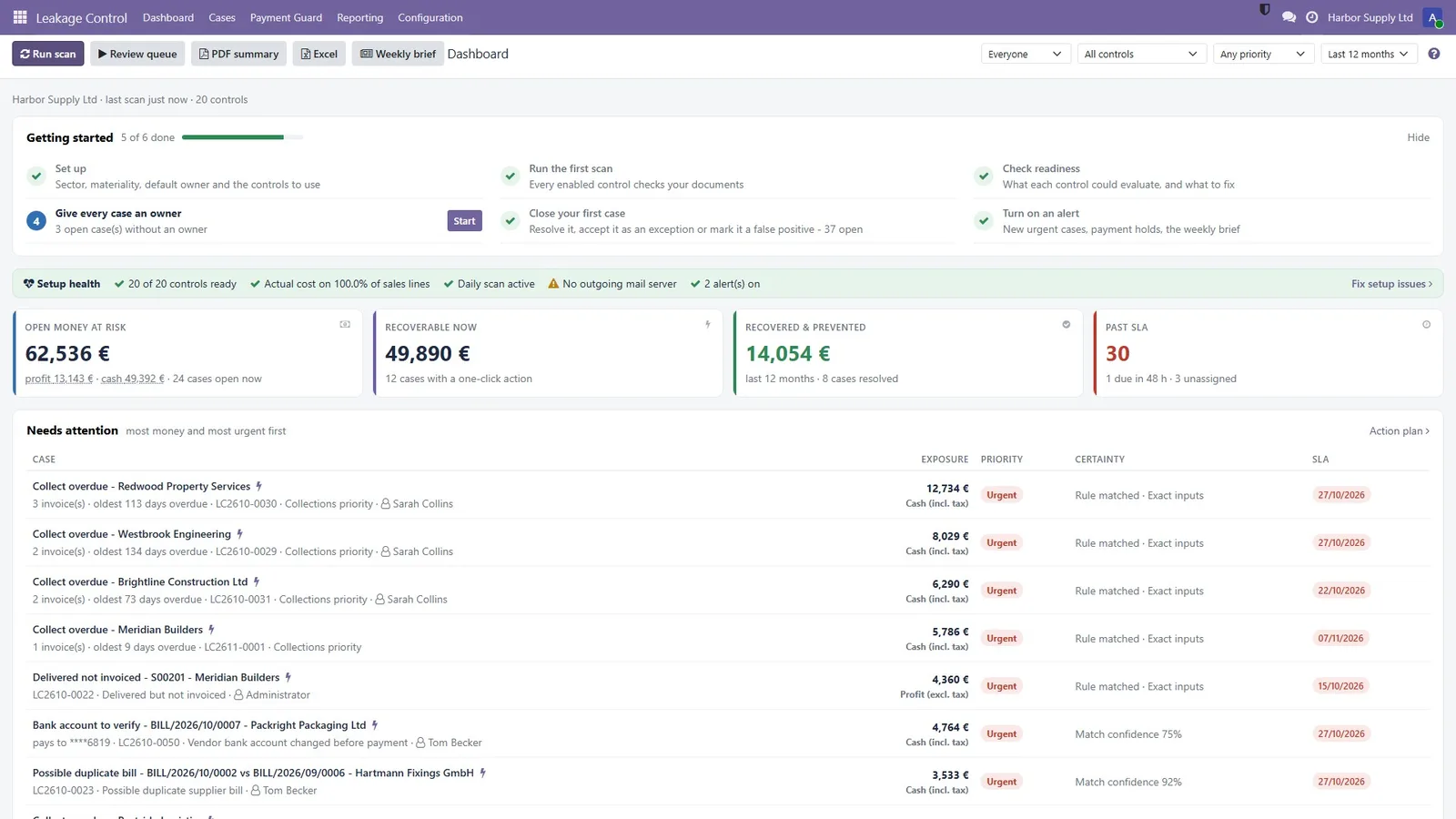
One open money at risk figure with its period, priorities, what changed, a Getting started checklist, and details on request: pipeline, watchlist, money at risk by control, weekly trend.

Cases with evidence

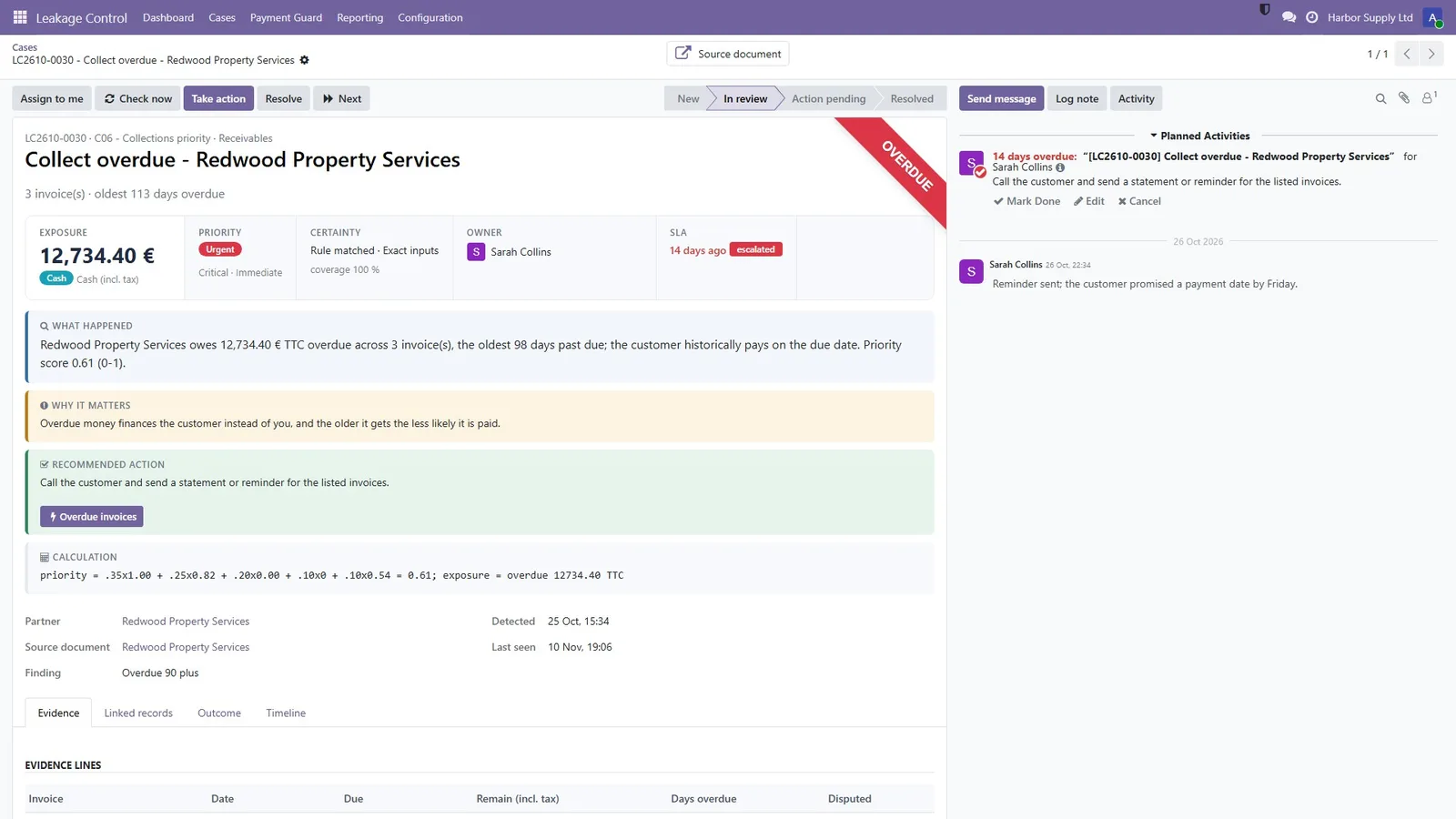
Exposure, priority and certainty on top; what happened, why it matters, the recommended action and the calculation, with evidence lines and links to the source documents.

My work and case board

A review queue, a case board, and list, activity, pivot and graph views with quick filters and shared favourites, ranked by an action score.

Payment Guard

Vendor bills linked to an open duplicate, three-way mismatch, surcharge or changed bank account case are put on hold using Odoo's own Blocked payment status.

Bill entry check

A draft bill that looks like a duplicate or doesn't match its purchase order is flagged when it is entered. Warn or block: your choice.

Credit hold

Sales orders above the customer's credit limit, or with invoices overdue beyond your threshold, wait for a manager's approval.

Results and ROI

Detected, confirmed, recovered and prevented; precision, capture rate, days to close and SLA, with sample sizes shown.

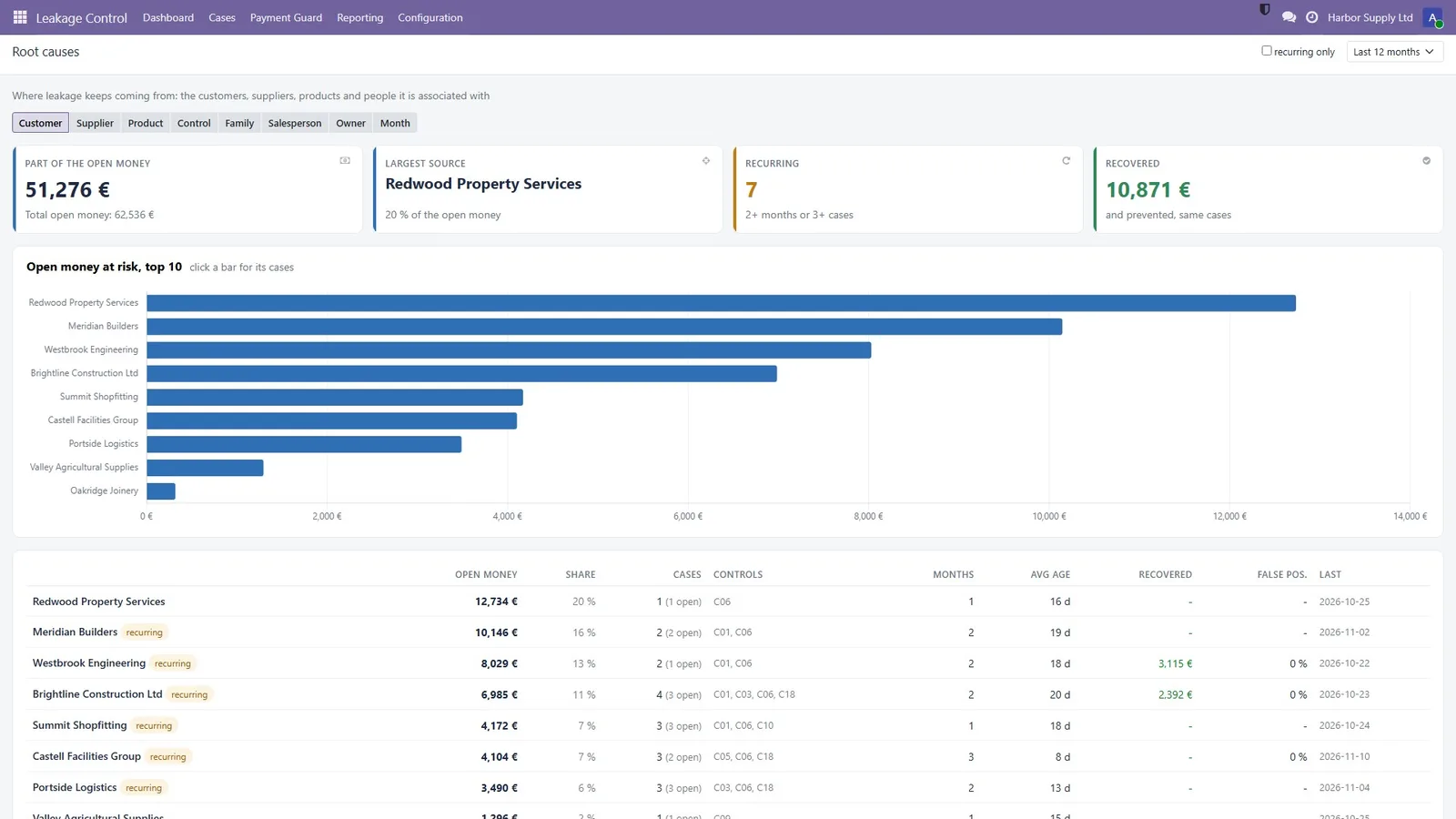
Root causes

Losses by customer, supplier, product, salesperson, owner, control or month, with recurring patterns flagged.

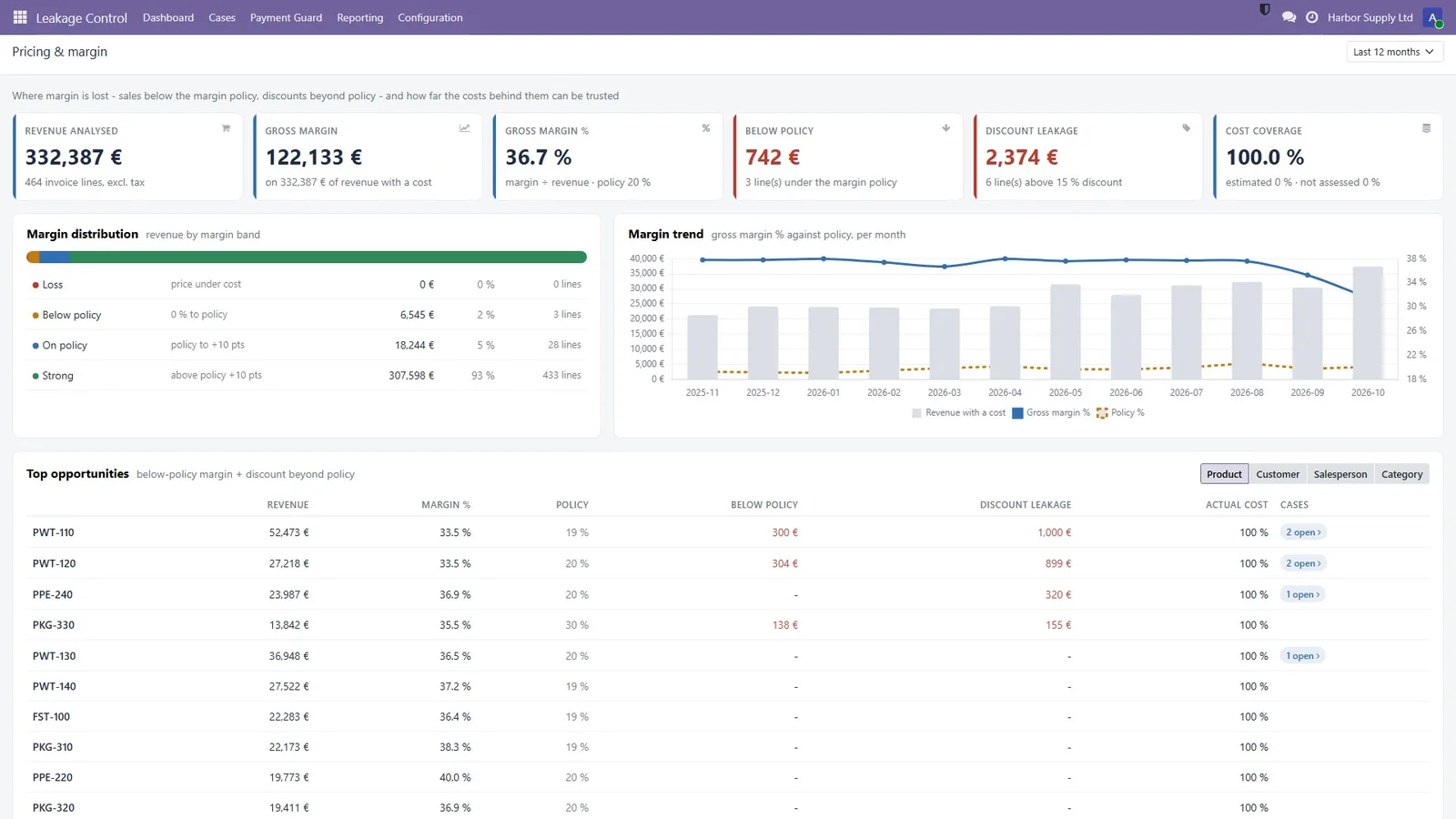
Pricing and margin

Gross margin on trusted costs, below-policy margin, discount leakage, cost coverage and the products whose costs need fixing.

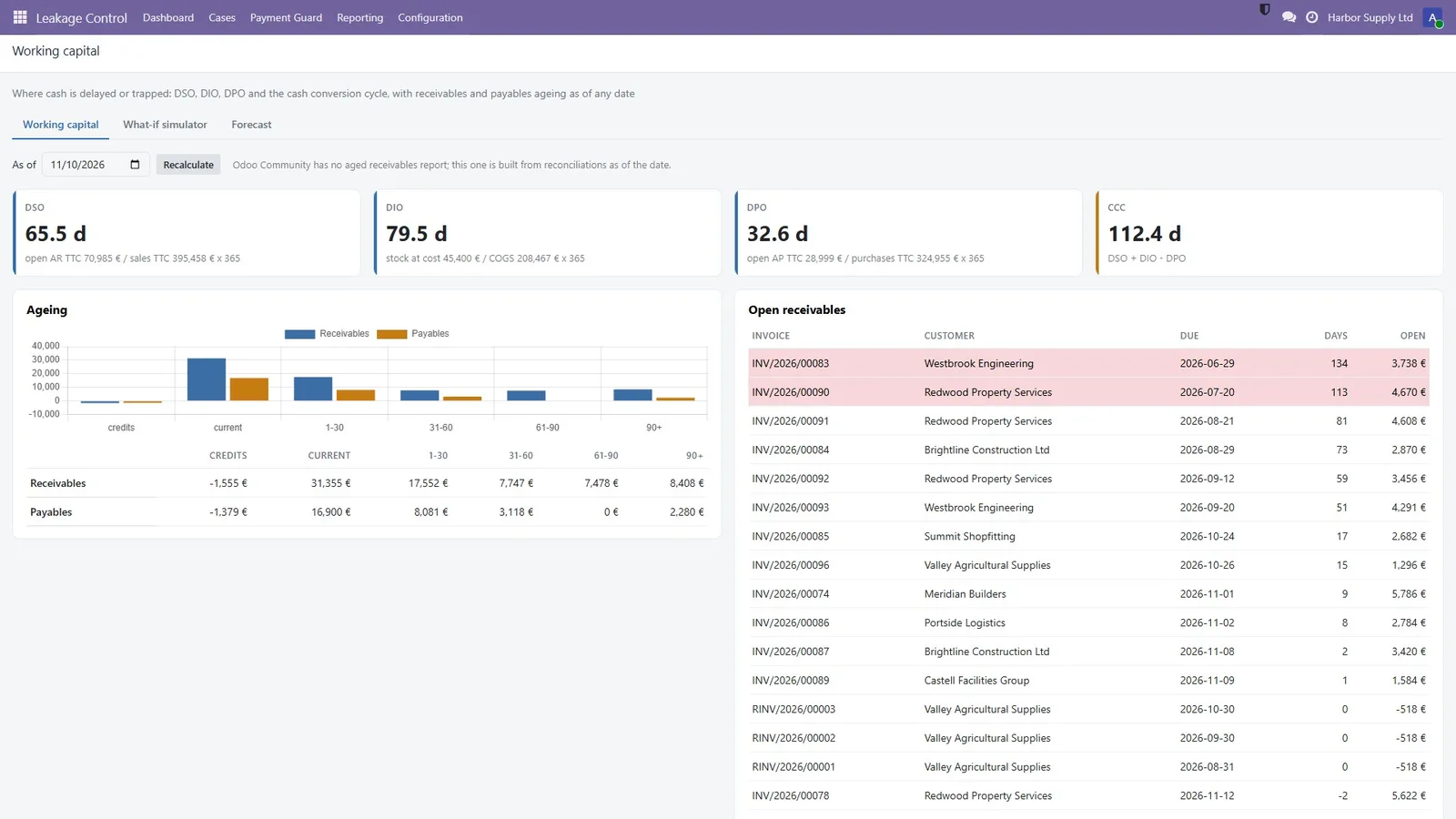
Working capital

DSO, DIO, DPO, cash conversion cycle and ageing as of any date, plus bill forensics, a weekly brief and an action plan.

PDF evidence pack

An evidence PDF with a SHA-256 fingerprint of the evidence, for your auditor or your supplier. Exporting it is a separate right.

Alerts and smart buttons

Alerts in Odoo and by email, off until you switch them on. Smart buttons show the money at stake on customers, vendors, invoices, bills, orders and products.

The 20 controls

Each control with its formula and its evidence

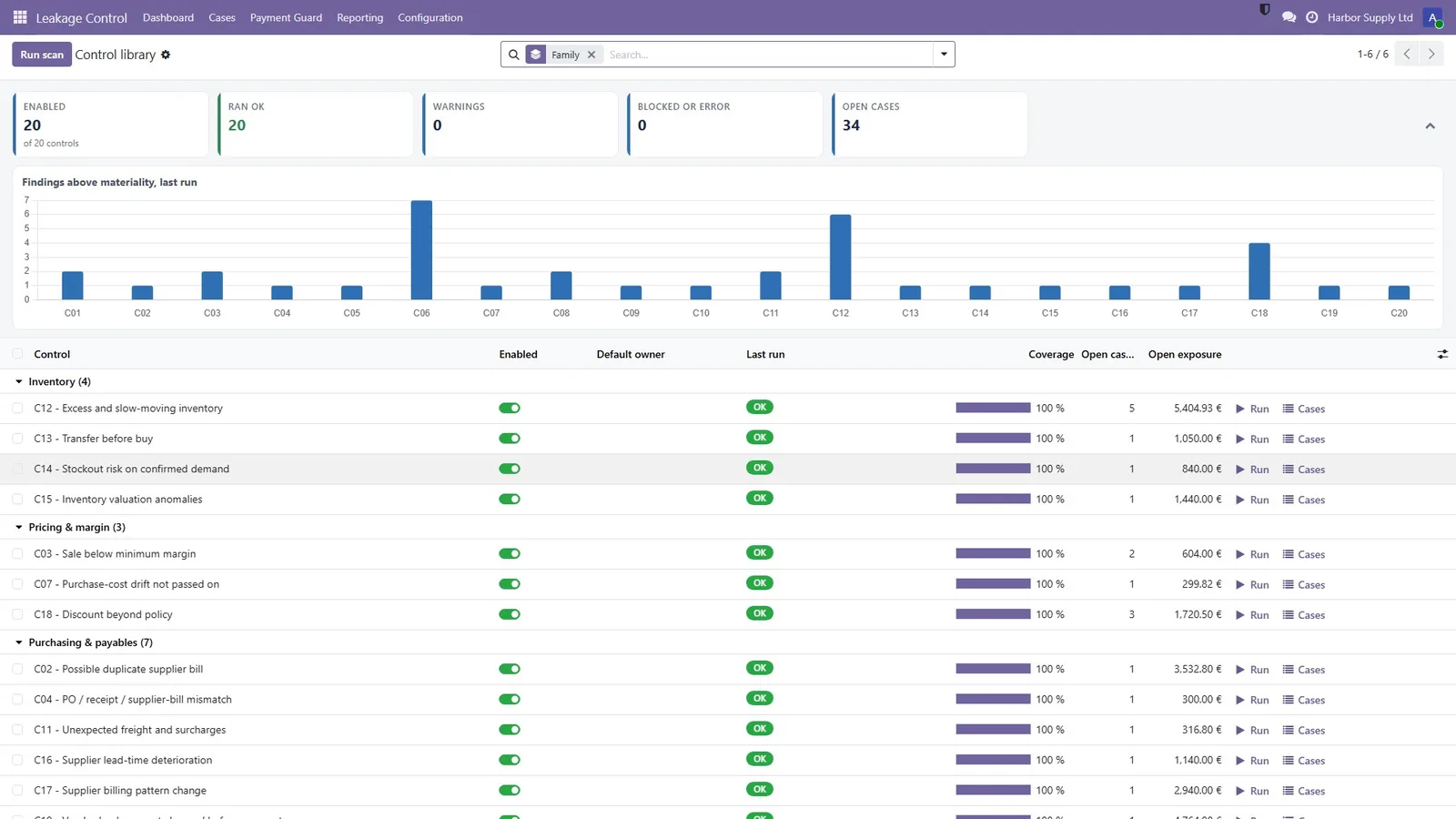
Every control has a page with its purpose, formula, data needs, thresholds and a preview, plus sector presets for wholesale, services and manufacturing.

CodeControlWhat it findsMeasured as
C01Delivered not invoicedGoods shipped but never billed (credit notes and drafts taken into account)Profit
C02Duplicate vendor billsSame bill entered twice, including fuzzy references and different vendor recordsCash
C03Sale below minimum marginLines sold under your target margin, invoice discounts spread, credit notes nettedProfit
C04PO / receipt / bill mismatchThree-way match: billed above the PO price or for more than was receivedProfit
C05Unbilled project time and expensesBillable timesheets and expenses not on any invoiceProfit
C06Collections priorityWho to call first: amount, age, payment history and disputesCash
C07Purchase cost drift not passed onVendor prices went up, your selling prices did notProfit
C08Suppliers paid early without benefitBills paid well before the due date with no early-payment discountFinancing cost
C09Credit-note anomaliesCustomers with unusually high credit notes (corrections excluded)Profit
C10Customer credit exposureOver the credit limit, or open orders for chronic late payersRisk exposure
C11Unexpected freight and surchargesCharges on vendor bills that were not agreed on the POProfit
C12Excess and slow-moving stockStock beyond lead time + safety + target cover, and dormant itemsStock value
C13Transfer before buyOpen POs for goods another warehouse already holds in excessCash
C14Stockout risk on confirmed demandOrders that cannot be served in time, and the margin at riskProfit
C15Stock valuation anomaliesNegative stock, stock valued at zero, product costs far from purchase costsStock value
C16Vendor lead-time deteriorationSuppliers whose delivery times are getting longer, with open PO valueRisk exposure
C17Vendor billing spikesUnusual jumps in a supplier's monthly billingRisk exposure
C18Discount beyond policyInvoice lines discounted beyond your maximum, against agreed or list pricesProfit
C19Vendor bank account changedOpen bills to be paid to a bank account that is new, was changed, differs from the last payment or is shared with another partnerCash
C20Purchases split under the approval limitSeveral orders to one vendor within days, each under the approval amount, together above itRisk exposure
Materiality floor

Findings below the floor (default 100) are hidden from the work list and stay available under “Below materiality”, so the team isn't flooded.

Readiness

Shows, per control, its coverage and how to fix what it could not evaluate. Controls that need Inventory, Purchase or Timesheets say so.

Never summed

Profit, cash, risk exposure and stock value are different bases. They are shown side by side, never added into one grand total.

Payment Guard

Stop the payment before the money leaves

Suspicious vendor bills are held for review with Odoo's own Blocked payment status. Once someone decides, they become reviewed.

Holds with a reason

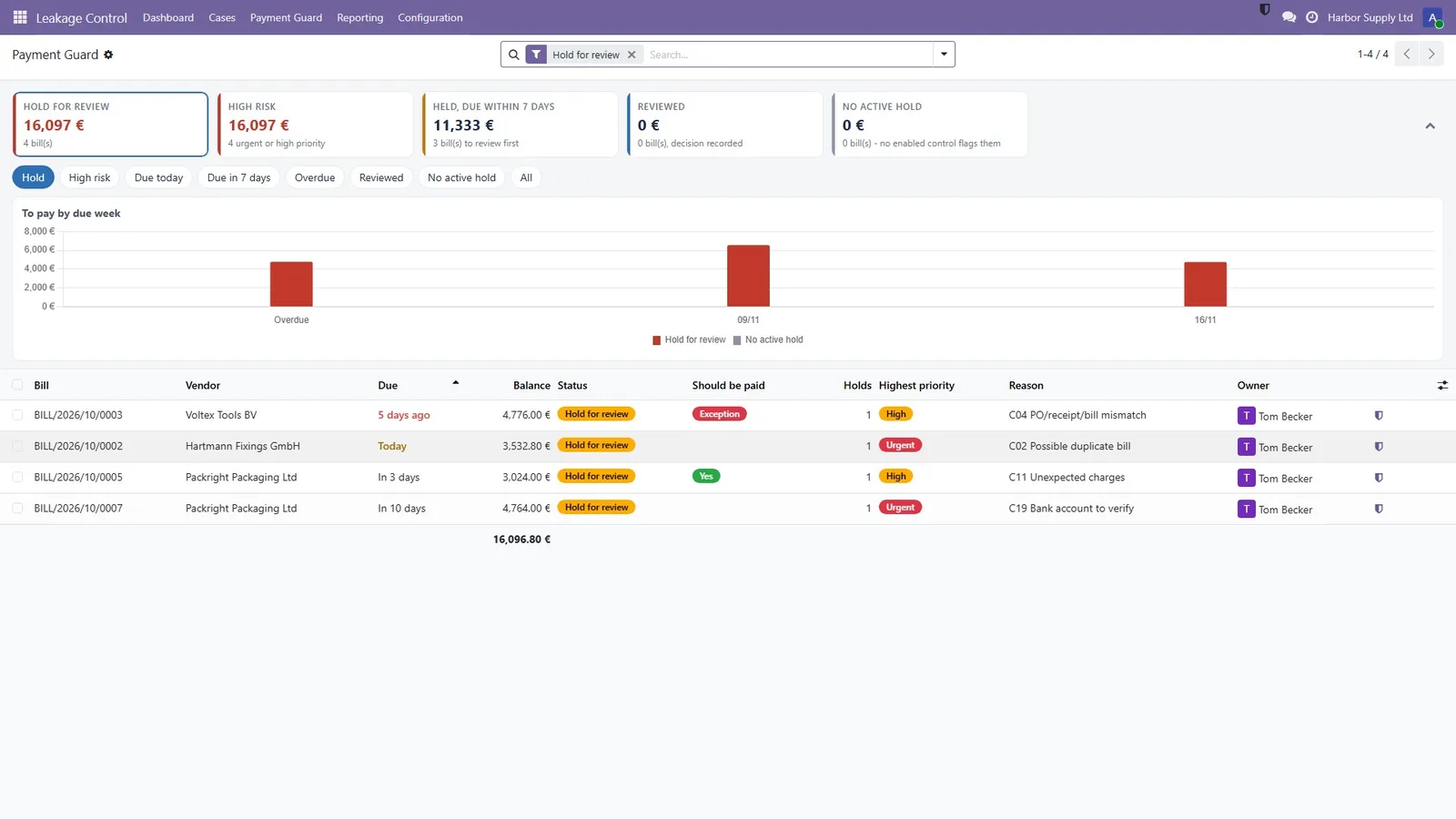
Bills linked to an open duplicate-bill, three-way-mismatch, surcharge or changed-bank-account case are listed with their priority, reason and owner.

Should this bill be paid?

With Inventory and Purchase, each bill shows whether ordered, received and billed quantities agree. Odoo's Pay dialog warns before a held bill is paid.

Checked at entry

A draft bill that looks like a duplicate or doesn't match its purchase order is flagged as it is entered, and account numbers are masked.

Case workflow

Every case ends in one of three outcomes

So the results you report are real: cleared cases are never counted as recovered.

Resolved

Recovered, prevented or process fixed, with the recovered or prevented amount recorded on the case.

Accepted exception

Kept on purpose, with a reason, an approver and an expiry date, so it comes back for review.

False positive

Not a real leak. Recorded with the rest of the history in an immutable audit trail.

Screenshots

A tour of the app

Fictional showcase data (Harbor Supply Ltd). Click any image to enlarge.

Profit Leakage Control for Odoo: open money at risk, priorities and what changed
Dashboard — open money at risk, priorities and what changed
Profit Leakage Control for Odoo: exposure, priority, certainty, owner, SLA and the calculation
Case — exposure, priority, certainty, owner, SLA and the calculation
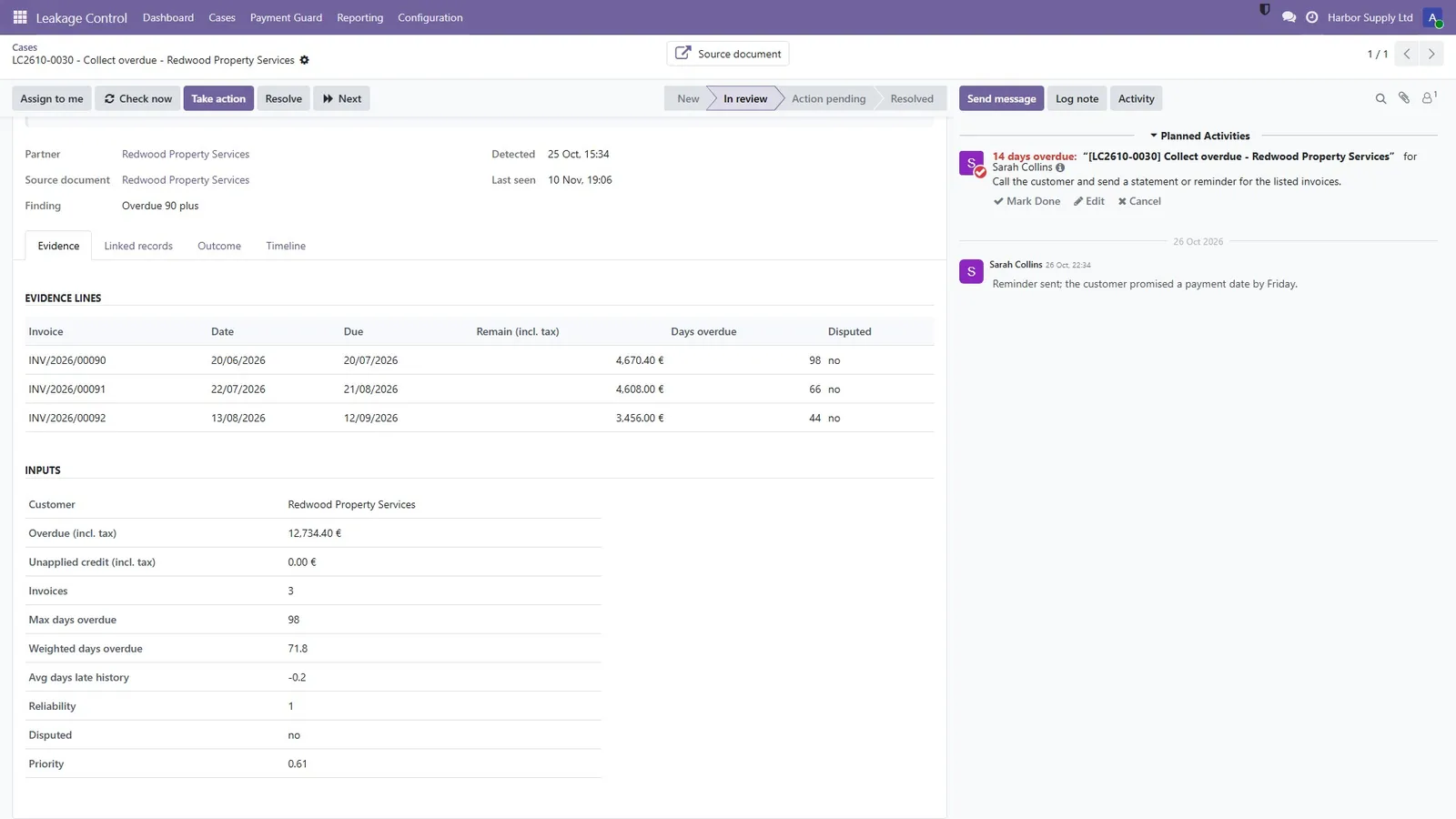
Profit Leakage Control for Odoo: the documents and every input of the calculation
Case evidence — the documents and every input of the calculation
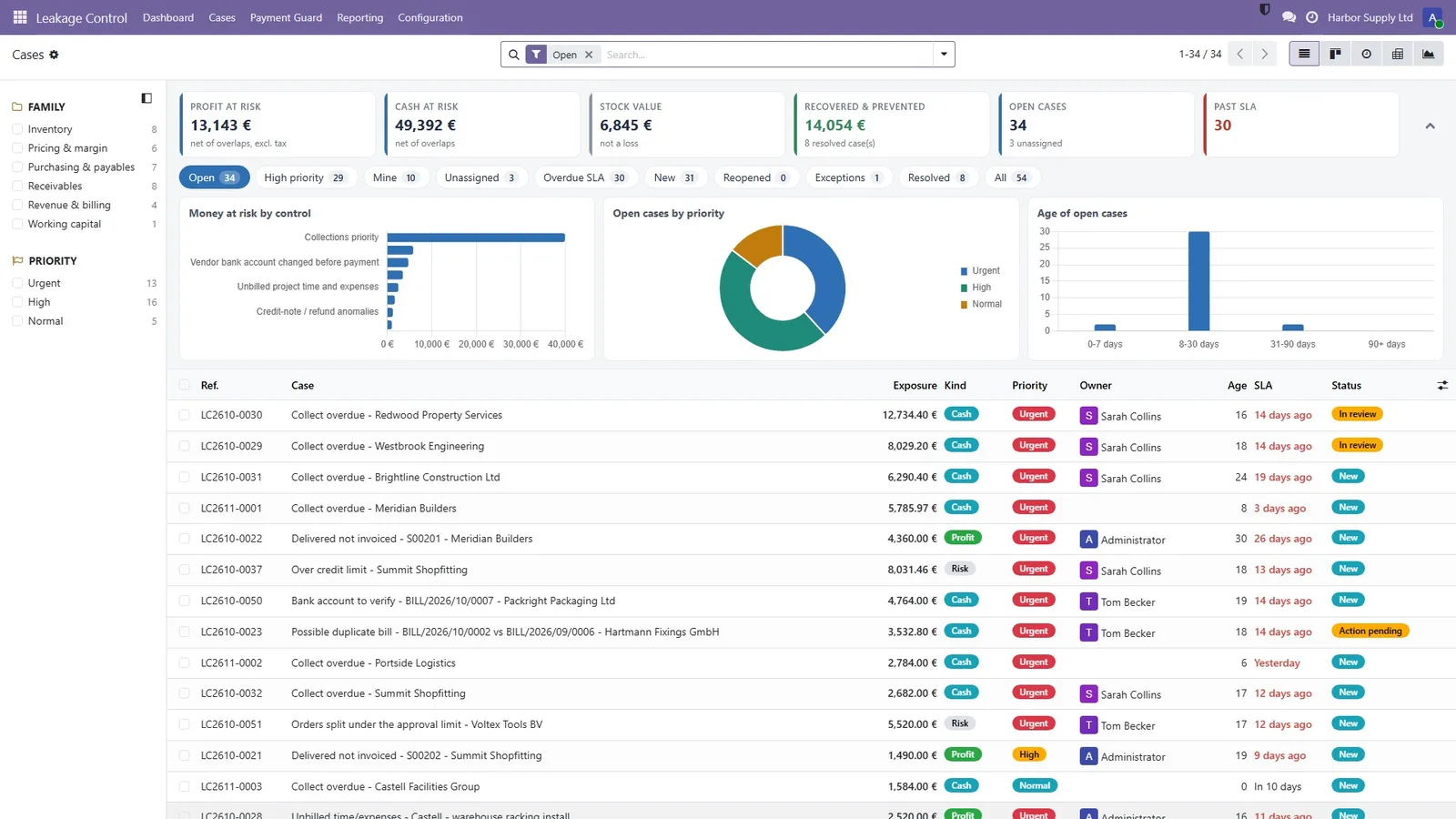
Profit Leakage Control for Odoo: list with filters, grouping and the money at stake
Cases — list with filters, grouping and the money at stake
Profit Leakage Control for Odoo: held vendor bills with priority, reason and owner
Payment Guard — held vendor bills with priority, reason and owner
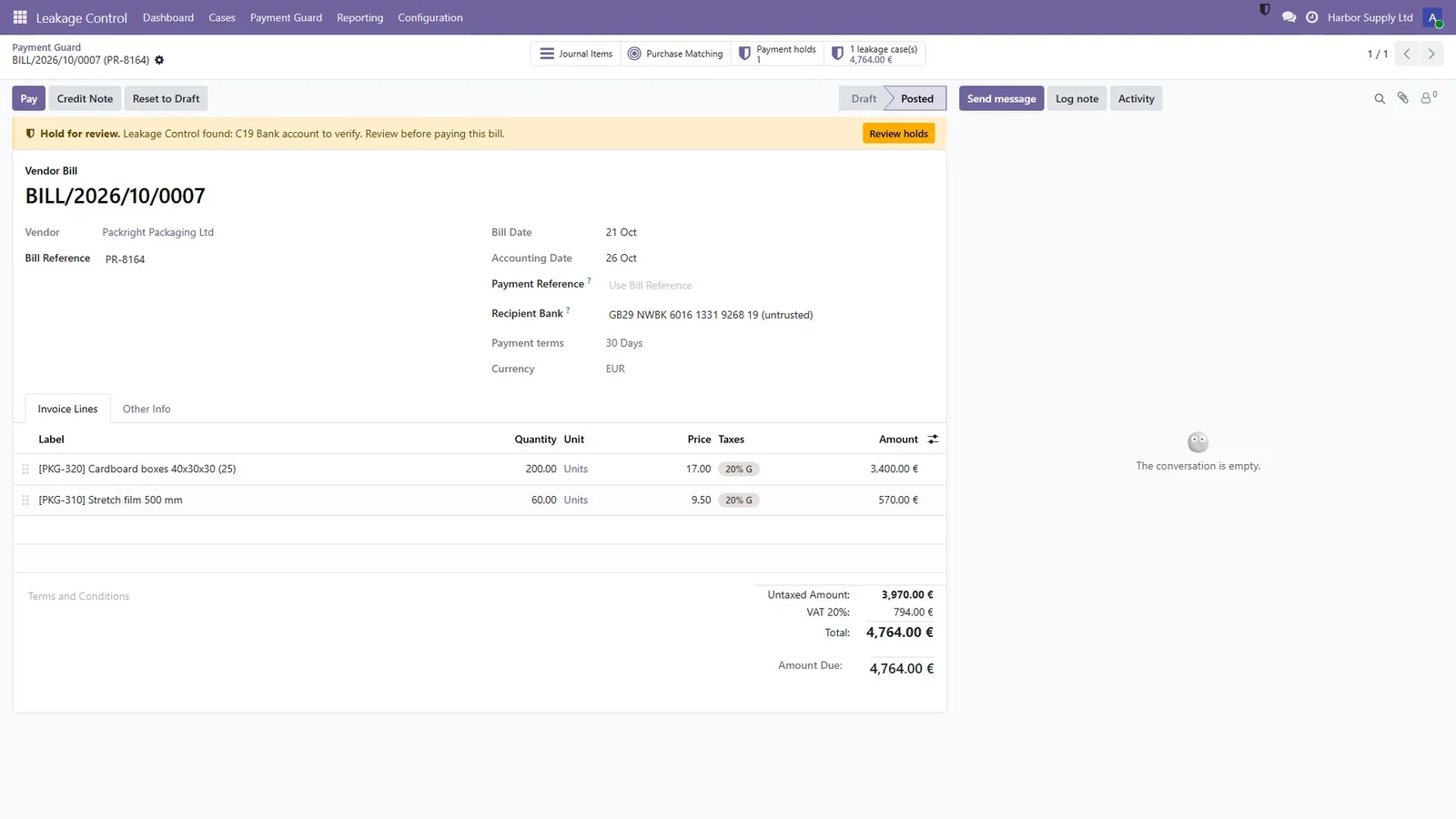
Profit Leakage Control for Odoo: a vendor bill on hold for review, inside Odoo
Bill on hold — a vendor bill on hold for review, inside Odoo
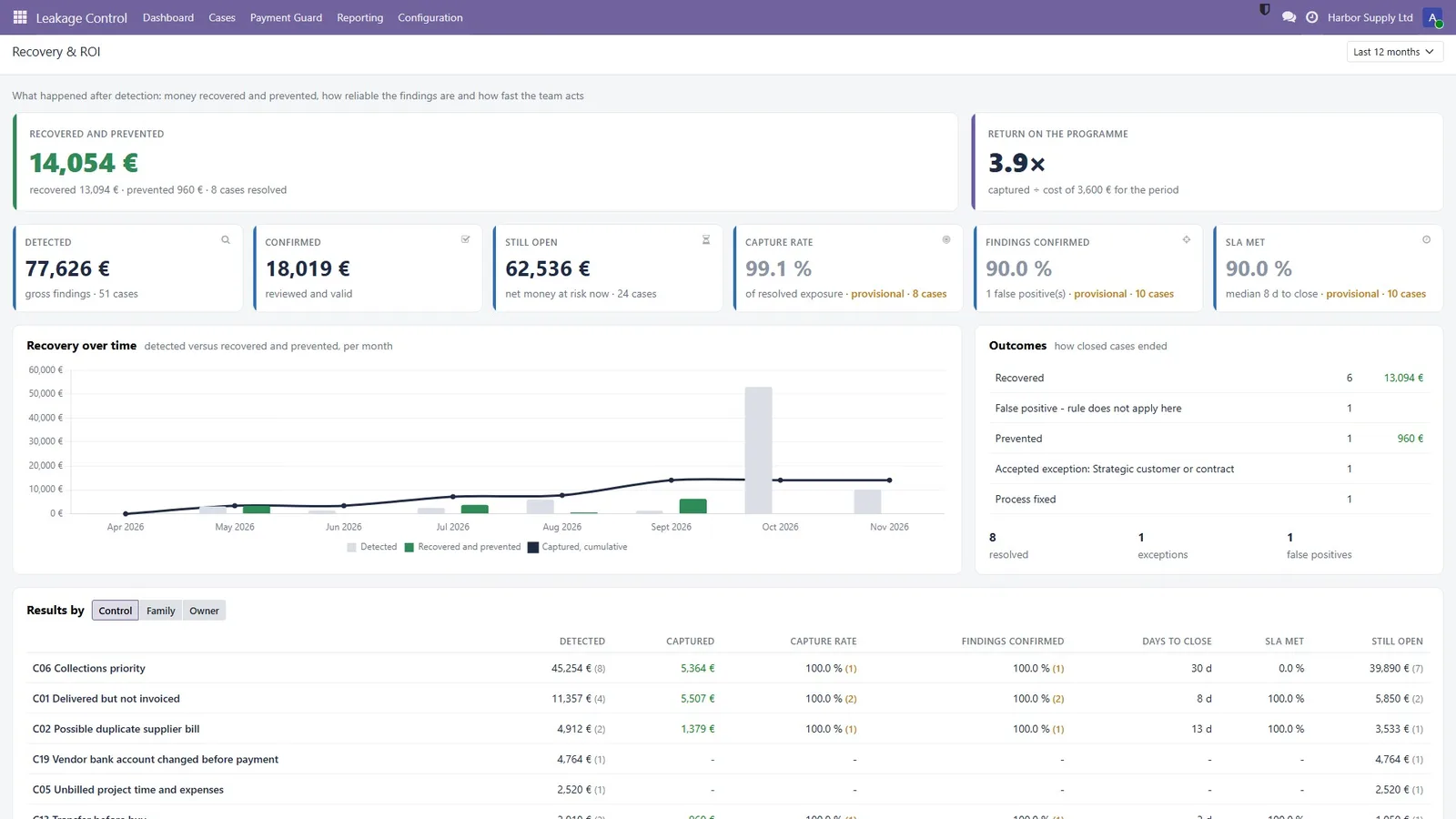
Profit Leakage Control for Odoo: what was recovered and prevented
Recovery and ROI — what was recovered and prevented
Profit Leakage Control for Odoo: by customer, supplier, product or control
Root causes — by customer, supplier, product or control
Profit Leakage Control for Odoo: margin on trusted costs and discount leakage
Pricing and margin — margin on trusted costs and discount leakage
Profit Leakage Control for Odoo: DSO, DIO, DPO, cash conversion cycle and ageing
Working capital — DSO, DIO, DPO, cash conversion cycle and ageing
Profit Leakage Control for Odoo: every control with its thresholds and coverage
Control library — every control with its thresholds and coverage
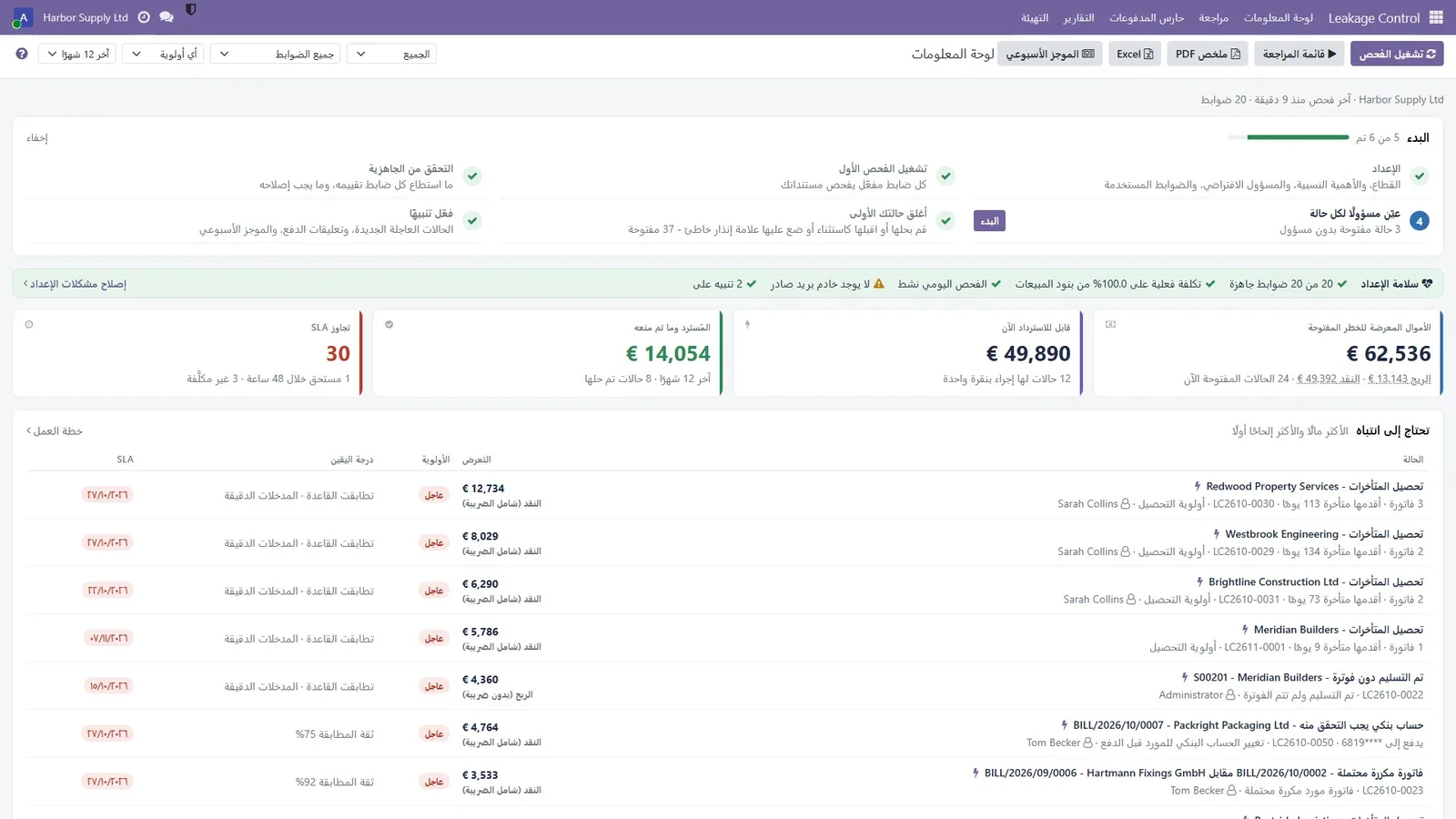
Profit Leakage Control for Odoo: the dashboard in one of seven languages
Arabic, right-to-left — the dashboard in one of seven languages

Built for your team

Who it is for

Companies running Odoo 19 Invoicing and Sales, with or without Inventory and Purchase: wholesale, services and manufacturing.

Finance managers and CFOs

See open money at risk by control, what was recovered and prevented, and working capital, with honest numbers that never mix profit, cash and risk.

Accounts payable

Duplicate bills, three-way mismatches, unexpected surcharges and changed bank accounts are held in Payment Guard before money leaves.

Accounts receivable and credit

Collections priority tells you who to call first; credit hold stops new orders for customers over their limit or chronically late.

Sales and pricing

Margin policies per product, customer or category, discounts beyond policy and supplier cost rises that were never passed on.

Operations and purchasing

Excess and slow-moving stock, transfer before buy, stockout risk on confirmed demand and vendor lead times getting longer.

Auditors and controllers

Every case has a formula, evidence lines, an outcome with a reason and an immutable audit trail, plus an evidence PDF with a fingerprint.

Trust & security

Built to be believed

A control tool is only useful if finance trusts its numbers. These are the rules it follows.

Read-only scans

The scans never change your documents. Fixes go through standard Odoo screens that you confirm yourself.

Honest numbers

Profit, cash, risk exposure and stock value are never summed. Findings on the same document count once. Margin is margin on price, never markup.

Nothing counted twice or too early

Rates on small samples are marked provisional, lines without a cost are not assessed, and cleared cases are never counted as recovered.

Data stays on your server

Everything runs inside your Odoo database. No external Python libraries, and nothing is sent to any service unless you switch on the optional AI.

AI is optional and off

Switched on with your own Anthropic or OpenAI key, it explains cases and drafts messages, and rejects any answer with a figure not in the evidence.

Roles and multi-company

View, Work cases and Configure / run scans, plus a separate right to export evidence PDFs. Cases, controls, alerts and settings are per company.

Quick start guide

From install to your first case, guided by the Getting started checklist.

1

Install the app

Get it from the Odoo Apps store and install Profit Leakage Control. A daily scan is scheduled automatically. If Inventory and Purchase are installed, the free Leakage Control Stock add-on installs itself.

2

Explore the showcase (optional)

On a database with demo data you can explore Harbor Supply Ltd, a sample wholesaler with a year of trading and cases at every stage.

3

Follow Getting started

Open Leakage Control. The Getting started checklist on the Dashboard walks you through setup, the first scan, readiness, owners and alerts.

4

Set your margins

Set minimum margins per product, customer or category in Configuration → Margin policies.

5

Work the cases

Work the cases from My work. Bills on hold wait in Payment Guard, and Odoo's Pay dialog warns before one is paid.

Frequently asked questions

Does it change my invoices or orders?

No. Scans only read data. Fix actions open the standard Odoo wizard (invoice, credit note) for you to confirm.

Will it flood us with small findings?

No. A materiality floor (default 100) hides findings below it; they stay available under “Below materiality”.

What does certainty mean?

Rule controls either match or not, so they show “rule matched” and whether some inputs were estimated. Pattern controls (duplicates, statistics) show a match confidence. Data coverage is shown separately.

How does Payment Guard stop a payment?

Vendor bills linked to an open duplicate-bill, three-way-mismatch, surcharge or changed-bank-account case are put on hold with Odoo's own Blocked payment status, and Odoo's Pay dialog warns before a held bill is paid. Once someone decides, the bill is marked reviewed.

Does it work with multiple companies and currencies?

Yes. Cases, controls, alerts and settings are per company with record rules; amounts are in the company currency, and documents in other currencies are converted at their date.

Is the AI assistant required?

No. It is optional and off by default. Only when you switch it on and ask does the evidence of the case, or the figures of the page you ask about, go to the provider you chose, with your own key. Nothing else leaves your server.

Do I need Inventory and Purchase?

No. It installs with Invoicing and Sales. The stock, purchase-order and three-way controls are added automatically by a free add-on when Inventory and Purchase are both installed. The Readiness page shows what each control could check.

Which Odoo versions and hosting are supported?

Odoo 19, Community and Enterprise, on Odoo.sh or on-premise. It cannot be installed on Odoo Online (SaaS), because third-party Python apps are not allowed there.

How much does it cost?

129 EUR, a one-time purchase through the Odoo Apps store. The Leakage Control Stock add-on is free. Bug fixes for the purchased version are free.

Requirements

Runs on Odoo 19 hosted on Odoo.sh or on your own server. Not available on Odoo Online (SaaS).

Odoo
19.0
Edition
Community & Enterprise
Hosting
Odoo.sh or on-premise
Required apps
Invoicing, Sales
Optional
Inventory + Purchase, Timesheets, Expenses, Sales Margin
External libraries
None
Languages
EN · FR · DE · ES · IT · PT-BR · AR
Licence
OPL-1
Price
129 EUR

The Inventory and Purchase controls come in the free Leakage Control Stock add-on, which installs itself when both apps are present. Also available for Dolibarr.

Find the leak. See the evidence.
Measure what you recover.

Profit Leakage Control for Odoo 19: 129 EUR, one-time, through the Odoo Apps store. The store link will be added here at launch. Questions? Ask us.

More from SiliconBlaze

More Odoo apps and modules

Built to work side by side on the same Odoo data. See all Odoo work →